Wednesday, July 13, 2011

Integer Overflow (Bugs) in C

Integers is a fundamental data type in a C program, They are used to represent a finite subset of mathematical integers, C Provides us with a suite of functions, and quite a lot of modifiers for manipulating these integers , but if these functions and modifiers are not used properly and carefully they can lead top disastrous results like failing of a Program Logic , Security breach , A break in authentication applications etc.


Integer Overflow


Integer data types in C have a fixed size and limits and which cannot be changed dynamically, This drawback have resulted in a bug commonly known as ‘Integer Overflow bugs’. These bugs are one of the difficult bugs to track down and fix. It happens When an arithmetic operation attempts to create a numeric value that is larger than can be represented within available storage space.

Basically what happens is , As we add 1 to the maximum value than can be represented within a storage space , The integer overflows and resets to the minimum value it can hold .

To make it simple let’s take an example of a odometer (non-digital) an odometer is used to measure distances and it consists of different rings! When odometer reaches its maximum value i.e some 9999’s after that it rolls over to its lowest value i.e 0.

Demonstration


Bug.c
Code:
  #include
   
  int main()
  {
      int i=0;
   
      scanf("%d",&i);
   
      printf("Value %d" , i);
      
      return(0);
  }
Compiling :-
Code:
  gcc Bug.c –o Bug
Input : 1

Ouput :-
Code:
  1
  Value 1
Input : 2147483648
Code:
  2147483648
  Value -2147483648
Boom! See what just happened we have carried a successful Integer overflow attack o our application.

How it happened

I am currently using a 32 bit GCC compiler , with MAXIMUM integer limit set to 2147483647 , So as we add one more to it resets back to its minimum value i.e -2147483648.

This was just an example of how these bugs can be demonstrated , and believe me if you pick up 10 normal C applications and test them for these bugs I guarantee you’ll find at least one of them which is vulnerable.

A Challenge


In the following challenge, You have to force the application to print the success message.

Code:
  #include
   
  void printInt(unsigned int i)
  {
      if(i > 100)
      {
          printf("Success ! You did it!\nValue of Int : %u",i);
          return(0);
      }
  }
   
  int main()
  {
      int i=0;
   
      scanf("%d",&i);
   
      if(i > 100)
      {
          return(-1);
      }
      printInt(i);
      return(0);
  }
It may seem impossible at first, Read the article once more check if you are missing something , Read the Code carefully and you’ll get your solution.


Solution (don’t check it , at least before trying) :-


Give the input as ‘-1’
Code:
  -1
  Success ! You did it!
  Value of Int : 4294967295

Courtesy : Go4Expert (copied and pasted for my personal reference)
Download from Fileserve, Filesonic, FileFactory, etc Directly as Premium Users

Wireless Network Watcher, Find Out Who Is Connected To Your Wi-Fi Network


The device needs to use proper encryption to block third parties from accessing it. Many users do not know the differences between WEP or WPA encryption, or which of the encryption schemes they should select for best security.
That could leave their wireless routers open for unauthorized access, especially if no encryption or weak encryption is configured.
The best option here is to use the strongest encryption possible. That however may not be always possible, if devices that need to connect to the wi-fi router do not support that.
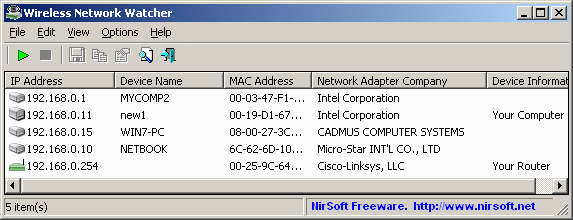
Wireless Network Watcher is a free software program that scans a wireless network for connected computer systems. It displays all computers that are currently connected to the network in its interface, making it dead easy to identify unauthorized access to the network.


Each connected device or computer is represented with an IP address, device name, MAC address, company that created the network adapter and device information. These information can be exported and saved to various formats including html, xml and text files.
The program is fully compatible with 32-bit and 64-bit editions of the Windows operating system. It supports all Windows versions from Windows 2000 to Windows 7, including Windows Server versions.
The program can only scan the wireless network the computer it is running on is connected to. Users who want to scan a network that they are not connected to need to connect to it first before scanning it.
It can happen that the wrong wireless network adapter is identified by the program. It is possible to select the right one under Advanced Options (F9).
Wireless Network Watcher is a portable program that will start the scan automatically right after it has been started. It can take a few seconds before the list is populated.
Windows users can download the program from the official website over at Nirsoft.

Source : ghacks


Wednesday, June 8, 2011

Universal Mobile Phone PC suite Phone Manager for Linux Ubuntu Fedora

Most of us use our computers to backup all the contacts, messages and calendars. This is generally done with the “PC Suite”-like applications provided by the vendor. Some of the most popular ones are Sony Ericsson PC Suite (recently revamped as SE PC Companion), Nokia PC Suite and a few others.

They all do one single thing – synchronize contents from your phone with your PC. Most of these suites provided by the vendor are Windows-only ( or sometimes support Mac too ).

What if you are running your favourite Linux distro? Do you boot Windows to use these suites? Or try running them from WINE (which probably fails to work)?

There is actually an open source phone manager for Linux. It’s called Gammu (strange name, I know!). Gammu is actually a command-line tool to manage your phone. A fine-crafted GUI is also available. It’s called Wammu.

With Wammu, you can do almost all the things the vendor-supplied PC suites offer: View call logs,contacts,calendar,messages; backup all your phone data and much more!

Mobile phone PC Suite Linux

Does my phone supports it?

Most of the phones are supported by Wammu. For the complete list, see – List of phones supported by Gammu

Installation

Installing Wammu is very easy. Just open terminal, and type the following:

Ubuntu: sudo apt-get install gammu wammu

Fedora: sudo yum install gammu wammu

Using Wammu

Wammu requires additional permissions to listen on the USB ports. So we recommend you starting Wammu as a root user from Terminal.

Just type

Ubuntu and Fedora: sudo wammu

Then connect your phone with USB cable or Bluetooth and select the proper port (you might have to try all listed there).

Note – Wammu cannot scan the ports unless you start it under root user. You must always start wammu as a root user as above

P.S: Even if your phone isn’t listed on the website, but your vendor name is, it is very likely that Wammu supports your phone. My W595 wasn’t listed but Wammu readily connected with all the features activated.

Integrate the Terminal with the Desktop On Linux


Over the years there have been all sorts of fun ways to edit one’s Linux terminal window. In addition to editing all the boring old things like text color and scroll settings, people have edited their headers, terminal behaviors, and even integrated an entire terminal window into their background.
Many people are fond of that last one, but it isn’t really all that easy to do. Most people employ the help of little programs for things like that, but the software used to embed the terminal is rarely updated to new versions of various distros.
One, however, has stayed intact, and this tutorial will help you through the process of putting the terminal right where we all need it – on the desktop.
First of all, you need to create a new Terminal profile that will run under the parameters you will set later. Open up your Terminal, then go to File, New Profile, type “Transparency” (without the quotes) as the title, and then click Create.
This creates the profile necessary to continue. You now need to fix a few settings. Under Title and Command, change the initial title to Transparency and select Keep Initial Title in the drop down menu. Select transparent under the Background tab, and set it to be as (you guessed it) transparent as you like. Some people prefer completely clear, but make sure the font color will stand out against your existing desktop background.
Next you want to download the program that will make all this possible. In your terminal, type:
sudo apt-get install devilspie
Next, you need to create a configuration file for your profile:
mkdir ~/.devilspie
gedit ~/.devilspie/Transparency.ds

Then take the following piece of code and pasted it in Transparency.ds:
( if
( matches ( window_name ) "Transparency" )
( begin
( set_workspace 4 )
( undecorate )
( skip_pager )
( skip_tasklist )
( geometry "890x694+178+58" )
( below )
( pin )
( println "match" )
)
)


Almost there! Now all you need to do is make sure that your computer opens a Terminal window in this manner each time it boots. Under System Settings open Startup Applications. First, click add, and under command, type:
devilspie -a
Then click enter. Click add again, and under command type:
gnome-terminal –window-with-profile=Transparency
That’s all there is to it. Reboot your system, and when it comes back up you should find a handy terminal window built right into your desktop, ready to work at whatever you desire.
terminal-desktop
If the configuration listed here does not quite work for you, experiment with the code you pasted in Transparency.ds under “geometry”. Those are the parameters the system uses to place the box. Of course, you can always fiddle with the color and transparency settings assigned to the profile by going to the Terminal and clicking on Edit, then Profile Preferences.
This neat, quick little quick little fix will be of interest to your Linux inclined friends and make Windows users wonder why they can’t do the same thing.

How to Block Facebook, Twitter, Email for Few Hours Daily


install the Website Blocker extension. Edit some settings and you can block any website for as many hours as you want.
Choose the settings wisely and the extension provides a simple interface to  block websites, as many as you want and at custom times you want. You can also type an optional message.


How to Block Any Website for Employees / Users


This extension works well if you want to prevent access of social media sites by your employees. Simply block the sites during working hours and they will never know how to access them.
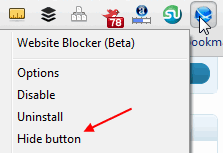
1. Hide the Website Blocker icon from the Chrome toolbar. Right click the icon and click “Hide button”
Hide button
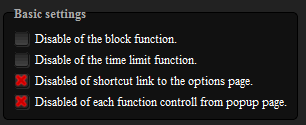
2. Disable the link from showing in the block message alert which can guide people to disable the options. Also disable the ability to edit settings from the popup alert options
block disable link
Unless people really know how to browse around into Chrome settings, identify the website blocker, experiment with its settings and disable it –  it should work to block websites for most people. Just keep Chrome as default and only browser on the computer.

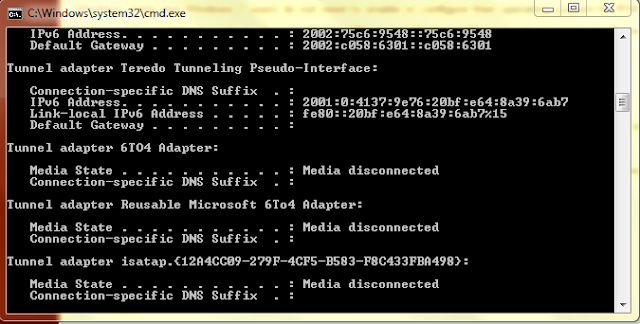
intro to ipv6

http://www.ghacks.net/2011/06/06/an-introduction-to-ipv6/

Tuesday, May 31, 2011

How to Crack a Wi-Fi Network’s WEP Password with BackTrack

http://lifehacker.com/286607/intermediate-guide-to-bittorrent?utm_source=Lifehacker+Newsletter&utm_campaign=eb4e813a91-UA-142218-1&utm_medium=email

Wireless Tether Turns Your Phone into a Wi-Fi Hotspot


Finally, Wireless Tether. For many users, this feature is the single most important thing in the world of mobile devices, so having the ability to use it is a must. Wireless Tether turns an Android phone, regardless of carrier, into a full blown W-Fi hotspot for any nearby devices that need one. It's as simple as that, but only rooted phones can use it.

*** If you get force closes after the update uninstall and install it again! ***
This program enables wifi AND bluetooth-tethering (PAN) for "rooted" handsets.
Clients (your laptop for example) can connect via wifi or bluetooth and get access to the internet using the mobile connection (4G, 3G, 2G) or (in case you are using bluetooth) the wifi connection which is established by the handset.
Wifi-tethering creates a so called adhoc (peer-to-peer) network on most devices. Infrastructure-mode is suppported for some devices – including the HTC Evo for instance.

** FEATURES **
-) Access-control feature. Allow/deny clients to use your mobile-data connection.
-) Wifi-Encrytion. 128-bit WEP in general. WPA/WPA2 on supported devices.
-) Reduce wifi-transmit power (on supported devices)
-) Settings for wifi-ssid, wifi-channel, „lan“-network and more.

This application requires a "rooted"-device and a (custom-) kernel which supports netfilter (iptables)!
** PREREQUISITE **
1) Root
2) Netfilter-enabled kernel

For more information visit our developer-site on google-code:
http://code.google.com/p/android-wifi-tether/

Use this application at your own risk. It is possible that use of this program may violate your carrier's Terms of Service.


Visit Developer's Website›

Friday, May 27, 2011

How do you enable Registry Editing again if it has been disabled by your administrator

First Method:

Click Start -> Run -> gpedit.msc -> User Configuration -> Administrative Templates -> System -> Prevent access to registry editing tools -> Right Click Properties -> Set it to Not Configured.

Second M! ethod:

Click Start -> Run. Type this command in Run box and press Ok. REG add HKCU\Software\Microsoft\Windows\CurrentVersion\Policies\System /v DisableRegistryTools /t REG_DWORD /d 0 Then a prompt will come up with this question: Value DisableRegistryTools exists, overwrite (Y/N)? Type yes and hit Enter. After u did that also type this command in the run box and hit enter. REG add HKLM\Software\Microsoft\Windows\CurrentVersion\Policies\System /v DisableRegistryTools /t REG_DWORD /d 0 Then it will also come up with the question: Value DisableRegistryTools exists, overwrite (Y/N)? Type yes and hit Enter.

Third Method:

STEP1. Disable as much as you can from your startup. Remove programs from your startup folder and such, so as not to lag down the bootup process.

STEP2.Create a new shortcut on your desktop, point it to "C:\Windows\regedit.exe"

STEP3.Log off, then log back on.

STEP4.A! s soon a s you see your desktop, double click on the shortcut. The system does not check for policies until a few seconds after it booted up. If you click on the icon fast enough, it should let you get in. After you close it though, it will not open unless you redo step 3 and 4.

Fourth Method:

Getting into the registry editor by making a vbs script in notepad: Open Notepad and copy this script into it. And save it as regtool.vbs on your desktop. VBS SCRIPT(select everything and copy into notepad and save as regtool.vbs): Option Explicit
'Declare variables
Dim WSHShell, rr, rr2, MyBox, val, val2, ttl, toggle
Dim jobfunc, itemtype
On Error Resume Next
Set WSHShell = WScript.CreateObject("WScript.Shell")
val = "HKCU\Software\Microsoft\Windows\CurrentVersion\Policies\System\DisableRegistryTools"
val2 = "HKLM\Software\Micro! soft\Windows\CurrentVersion\Policies\System\DisableRegistryTools"
itemtype = "REG_DWORD"
jobfunc = "Registry Editing Tools are now "
ttl = "Result"
'reads the registry key value.
rr = WSHShell.RegRead (val)
rr2 = WSHShell.RegRead (val2)
toggle=1
If (rr=1 or rr2=1) Then toggle=0
If toggle = 1 Then
WSHShell.RegWrite val, 1, itemtype
WSHShell.RegWrite val2, 1, itemtype
Mybox = MsgBox(jobfunc & "disabled.", 4096, ttl)
Else
WSHShell.RegDelete val
WSHShell.RegDelete val2
Mybox = MsgBox(jobfunc & "enabled.", 4096, ttl)
End If Open regtool.vbs And there you go!

Wednesday, May 25, 2011

Trace route and path ping in network trouble shooting

http://www.ghacks.net/2011/05/24/network-troubleshooting-basics-tracert-pathping/

Collection of Tools and Tricks to bypass Megavideo 72 Minutes Time Limit

http://www.blogsolute.com/megavideo-time-limit-tricks-addons-scripts-tools/8242/

Watch the video on MegaVideo even if the link gets deleted.

Yes, what you read is right. While browsing for some videos , there appears a message that the video is deleted. Ex : http://www.megavideo.com/?v=BH6VMIAP
Luckily, there is a solution to watch the same video which was deleted from Megavideo database.
Megavideo stores 3 copies of same video on their servers called mirrors. So, even if one link is deleted, you can watch the video from rest of other two. Trick is to find those two links.

Mega Video tools to find mirror links are called Regenerators though they don’t regenerate actually. We have a solution which can be accessed by installing addon on your browser (Firefox and Chrome only), Bookmarklet or simply visit http://regen.videourls.com/


Friday, May 20, 2011

JDBC

This article deals with JDBC completely.

What is JDBC?
Posted on: April 13, 2007 at 12:00 AM
JDBC is Java application programming interface that allows the Java programmers to access database management system from Java code.

The Java application programming interface provides a mechanism for dynamically loading the correct Java packages and drivers and registering them with the JDBC Driver Manager that is used as a connection factory for creating JDBC connections which supports creating and executing statements such as SQL INSERT, UPDATE and DELETE. Driver Manager is the backbone of the jdbc architecture.

JDBC has four Components:

1. The JDBC API.
2. The JDBC Driver Manager.
3. The JDBC Test Suite.
4. The JDBC-ODBC Bridge.


The API technology provides the industrial standard for independently connecting Java programming language and a wide range of databases.


The JDBC Driver Manager.

The JDBC Driver Manager is a very important class that defines objects which connect Java applications to a JDBC driver. Usually  Driver Manager is the backbone of the JDBC architecture. It's very simple and small that  is used to provide a means of managing the different types of JDBC database driver running on an application. The main responsibility of  JDBC database driver is to load all the drivers found in the system properly as well as to select the most  appropriate driver from opening a connection to a database.  The Driver Manager also helps to select the most appropriate driver from the previously loaded drivers when a new open database is connected.

The JDBC Test Suite.

The function of  JDBC driver test suite is to make ensure that the  JDBC drivers will run user's program or not .

 The JDBC-ODBC Bridge.

The JDBC-ODBC bridge, also known as JDBC type 1 driver is a  database driver that utilize the ODBC driver to connect  the  database. This driver translates JDBC method calls into ODBC function calls. The Bridge implements Jdbc for any database for which an Odbc driver is available. The Bridge is always implemented as the sun.jdbc.odbc Java package and it contains a native library used to access ODBC.


Layers of the JDBC Architecture


Type 1 JDBC Architecture


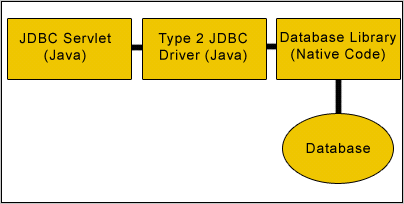
Type 2 JDBC Architecture


Accessing Database using Java and JDBC


For this, firstly we need to establish a connection between database and java file with the help of various types of APIs, interfaces and methods. We are using MySQL database.
Connection: This  interface specifies connection with specific databases like: MySQL, Ms-Access, Oracle etc and java files. The SQL statements are executed within the context of this interface.
Class.forName(String driver): It loads the driver.
DriverManager: This class controls a set of JDBC drivers. Each driver has to be register with this class.
getConnection(String url, String userName, String password): This method establishes a connection to specified database url. It is having three arguments:
        url: - Database url where stored or created your database
        username: - User name of MySQL
        password: -Password of MySQL
getMetaData(): This is a method of Connection interface. It retrieves the metadata of the database.
DataBaseMetaData: This interface gives information about the database like number of tables in the database, columns of the table etc.
getTables(null, null, "%", null): This method provides the description of the tables available in the given catalog. As we have set other parameters null, so it will provide only table names.

Code :

import java.sql.*;

public class AccessDatabases {
  public static void main(String[] args) {
    try {
      Class.forName("com.mysql.jdbc.Driver").newInstance();
      Connection con = DriverManager.getConnection(
          "jdbc:mysql://localhost:3306/test", "root", "root");
      Statement st = con.createStatement();
      DatabaseMetaData meta = con.getMetaData();
      ResultSet rs = meta.getTables(null, null, "%", null);
      String tableNames = "";
      while (rs.next()) {
        tableNames = rs.getString(3);
        System.out.println(tableNames);
      }
    } catch (Exception e) {
    }
  }
}


In this section we studies how to connect to database and then list all the tables in the database. We have used MySQL database server.


FOR REST OF THE TOPICS LIKE EXCEPTION HANDLING AND ETC,. GOTO SOURCE
Source : RoseIndia

Wednesday, May 18, 2011

Difference between Pointer and reference

In OOP like Java, guys often speak that there are no pointers but there are references. Here the reference or a reference pointers like as follows.
Dog d;
d.setName();

Here d is reference.
Actual concept of pointers is not implemented in Java due to the reasons like confusion and the hell caused by them.

However there are pointers in Java but in JCuda (Java bindings for the CUDA runtime and driver API) http://www.jcuda.de/jcuda/doc/index.html there is a class called jcuda.Pointer.                      


Java automatic memory management from Wikipedia

" One of the ideas behind Java's automatic memory management model is that programmers can be spared the burden of having to perform manual memory management. In some languages, memory for the creation of objects is implicitly allocated on the stack, or explicitly allocated and deallocated from the heap. In the latter case the responsibility of managing memory resides with the programmer. If the program does not deallocate an object, a memory leak occurs. If the program attempts to access or deallocate memory that has already been deallocated, the result is undefined and difficult to predict, and the program is likely to become unstable and/or crash. This can be partially remedied by the use of smart pointers, but these add overhead and complexity. Note that garbage collection does not prevent "logical" memory leaks, i.e. those where the memory is still referenced but never used. "

Monday, May 16, 2011

Lock Your Computer With USB Flash Drive

1.  Launch the predator.

2. Now Insert your USB.

3. Set the password when prompted.

4. Check that the drive letter displayed under “USB key drive” actually matches your flash drive or choose the correct letter from the dropdown list

5. Finally click on Create Key button and then on OK button

6. Restart the program.

Predator icon in the task bar turns green when started.

Features : 

  • Works with all versions of windows
  • Data on the USB won't get affected.


Enhanced by Zemanta

Disable Create, Rename Function For Files Folders Inside a Directory

PathLock is a small utility that lets you take full control of the actions of users on each path of the system, in two moves you can decide which directories users can rename files and folders, or create files and folders.

Features: Open Source


Sunday, May 15, 2011

Create Torrent of any File already Hosted on Web and Download it faster


Downloading a file from Internet using Bittorrent and direct FTP / HTTP are two different things. Torrents use Peer to Peer Technology where the load isn’t on single server instead file is served by multiple computers. Here’s How you can create Torrent of any file hosted on web and download via Bittorrent client.
BurnBit is a online service which can burn any file on web into torrent which contains meta data information about the content file. This .torrent file in turn can be downloaded via Bittorrent client on your system.

Why should I convert a File into Torrent when it is served directly?

While you are downloading file directly, it is possible that many others are downloading from same location. This increases load on server where it is hosted which results in slow download speed. So, Creating Torrent is viable option sometimes. And, if there are many other like you downloading via Torrent from BurnBit you get more peers, more speed from Server and Peers who successfully downloaded.
BurnBit says, If a file exists, there is torrent of it. If not, it will be burned.
So, this is a two way connection offering the maximum possible speed to download certain file. Incase, you are the first one, you can still get the download speed as usual and then you can keep seeding to offer it to the world.
For Webmasters who are sharing a file on their website, it is definitely worth giving .torrent download option to users and don’t even care to keep seeding all time for availability.

How to create Torrent for any file hosted on Web

You just need URL or link of the file and paste it on BurnBit homepage and hit BURN button. File will be processed in minutes and you are offered to download .torrent of that file.
Web masters can get script to embed on website and offer your readers to download the file via Bittorrent. Also, you can add additional HTTP mirrors for better connectivity and availability.
In short, BitBurn is useful to Webmasters in every way. However, for downloaders, it is more beneficial when it already exists on BitBurn database to get faster download speeds.

Tuesday, May 10, 2011

Top 10 MySQL Mistakes Made by PHP People

A lot of developers would choose PHP than any other programming languages. Why? Because PHP is commonly said to be faster and more efficient for complex programming tasks and trying out new ideas, and is considered by many to be more stable and less resource-intensive as well. It is a very powerful programming language. However, what you created in PHP is not effective if you implement a weak database. Commonly, when you work in PHP, you'll also probably work with MySQL for the database. Well, many would have problems involving PHP and MySQL and some of these are caused by the mistakes which are listed below:


1. Using MySQL and not MySQLi


This is one of the very very common mistake made by PHP people. PHP Manual recommends using MySQLi over MySQL

If you are using MySQL versions 4.1.3 or later it is strongly recommended that you use the mysqli extension instead.

2. User inputted data not sanitized/cleaned


When you are creating a form, it enables a user to input anything they want, therefore, exposing your database to any vulnerability that there is. Your code, which processes the input from your form, should be carefully written so as to ensure that the input is as requested. If not your database would be prone to SQL injection or any attack which could lead to its destruction.

3. Querying all the fields (*) instead of specific fields.


It is important to create your query based only on what you need. Using * returns all columns in a table. One disadvantage of this is - it is slower compared to the specific query because it extracts all the data stored in a specific table (and some of it may not be of use).

4. Using full-privileged users for database operations.


Privileges such as updating, adding, deleting, etc. should only be granted to users with such specific functions. Full privileges can be very powerful and in the same way harmful, and should be granted only when necessary to roles and trusted users of the database.

5. Poor naming standards.


When naming your databases, objects, fields, etc., use descriptive names. Name them so that when you go back to your code years from now, you still know what it is about. Sometimes, you name fields, tables, or databases with names that only makes sense to you. When you visit it again after a month or so, you can't even figure out what it is. So, better name them carefully and descriptively. There really isn't a right or wrong way to name them. Although there are some simple general rules that should be followed like not using spaces, avoiding the use of reserved words, not using dashes, etc.

6. Not properly normalized tables.


Normalization is the process of organizing data to minimize redundancy. It involves dividing large tables into smaller ones to produce well-structured relations. When not properly normalized, additions, deletions, and modifications of any data may lead to problems like data redundancy or data inconsistency.

7. Using usernames or other character typed fields as primary keys.


A primary key is anything unique that you assign to a specific record in your database. In other words, that certain record only belongs to that certain primary key. Using usernames or other character typed fields as primary keys may lead to accidental access to certain information.

8. Relying too much on PHP.


Instead of using MySQL functions to do the mathematical calculation PHP developer's prefer to be using PHP to perform those calculation. As an example AVG() is an built in Function in MySQL still I have seen many people prefer to be using PHP to get the average of values fetched from MySQL.

Apart from that comparing values, or any other operations that we need to solve, sometimes, we tend to create our own versions of functions which we don't know exists in MySQL. For example, using PHP script for comparison in order to determine the largest value in a group of data, when in fact, we can use the Max() function in MySQL. This can lead to unnecessary steps and ultimately results in slower code. Therefore, it is good to utilize your knowledge in MySQL, or in cases where you are not familiar enough with it, it's good to study and analyze MySQL.

9. Using wrong data types.


MySQL supports a number of data types which includes numeric types, date and time types, and string (character) types.So, for example, if you're storing dates use the Date data type. Using any other data type will only make it complicated. You should use the most precise data type for your data to ensure optimum storage and to reduce possible errors.

10. Not using UTF-8.


MySQL includes character set support that enables you to store data using a variety of character sets and perform comparisons according to a variety of collations. When creating a database, some of us forget to set the database to UTF-8 character set, which then makes us wonder why some of the data won't appear anywhere else. Setting it to UTF-8 usually solves those issues.  
source : Go4Expert
Sometime during the year of 2008, NRG businessman Subhash Shihora’s wife and six-month-old baby were not granted to board a flight from Delhi to Ahmedabad Irrespective of having a valid ticket because of a technical malfunction. Shihora, a significant stake-holder in the Rs 2 lakh crore Urok consultancy organisation within the UK, was so provoked he sued the air carrier for Rs 21 crore. He also wished to ensure that it by no means occurred repeatedly. And he found a way out — Shihora has grown to become the first Indian to buy the world’s first commercial flying car branded ‘Transition’, developed by a company in Massachusetts, United States.

Shihora now wants the car to be placed at his farmhouse off SG Road in Ahmedabad. But he worries obtaining consent could possibly not be easy. He will require clearances from not just aviation agencies, but protection bureaus as well, and has recently commenced communicating officials.

“I fly down to Ahmedabad at least six times a year and then fly to Mumbai and Rajkot. I had taken a test drive of the flying car. By pressing just one button, the car turns into an aircraft. I have started taking flying lessons to get the licence,” says Shihora. He booked the car in 2009 and will get delivery in 2012. Shihora, who moved to UK in 1998, booked it for Rs 1 crore and will pay another Rs 1 crore by the time it is delivered. “With all taxes and duties paid, the car will cost me around Rs 6 crore in Ahmedabad.”

The car, specifically designed with collapsible wings, safely and effectively completed its first voyage on March 5, 2009 and not long ago received clearance from the US Department of Transportation’s Federal Aviation Administration. The two-seater means of transportation falls inside the light aircraft classification and calls for a private pilot licence to fly it. The vehicle, which is sufficient enough to fit into a home garage and runs on unleaded petrol, will be able to travel up to 450 miles, and has the capability to fly at 115 mph.

Colonel VK Nagar, an aviation industry expert, says, “Directorate General of Civil Aviation and Airports Authority of India (AAI) may give permission under the micro light aircraft category. But a vehicle that can both be driven on roads and can be taken to the skies from anywhere may create issues with security agencies.”

source : NewTechnologyWorld

for more details and pictures, goto the source website.

Saturday, May 7, 2011

Fast Voip now offers Free calls to 13 countries including India

FastVoip announced their best ever deal to make India calls totally free along with other 12 countries where you can make free calls.FastVoip, a leading VOIP company from Europe has just announced their biggest ever promotion to date. FastVoip has now emerged as a strong competitor after this latest announcement to offer free calls to over 13 countries including India Landine.

You can make calls to following countries using FastVoip.

Belgium
Netherlands
Canada (+mobile)
Poland
China
Sweden
France
Thailand
Germany
United Kingdom
India
United States (+mobile)
Italy

Please note the only calls to landline phones are free except for USA and Canada where calls to mobile phones are free too.

In order to use the Free Calls promotion, you need to make a minimum deposit of 5 Euro by Credit card or $7.50 by Ukash. You will need to recharge your account every month for this amount in order to keep the free call service active.
Download FastVoip and start making those free calls.

Hack into a Live Security Camera

This is a part of Google Hacking. I already posted different keywords to use in Google search engine and get many hidden results. The link is here. Now this post is latest.  Just search these following strings in Google and select any result. Whoa, you can see a live cam on your PC screen!! The strings are given below:
inurl:”CgiStart?page=”
inurl:/view.shtml
intitle:”Live View / – AXIS
inurl:view/view.shtml
inurl:ViewerFrame?Mode=
inurl:ViewerFrame?Mode=Refresh
inurl:axis-cgi/jpg
inurl:axis-cgi/mjpg (motion-JPEG) (disconnected)
inurl:view/indexFrame.shtml
inurl:view/index.shtml
inurl:view/view.shtml
liveapplet
intitle:”live view” intitle:axis
intitle:liveapplet
allintitle:”Network Camera NetworkCamera” (disconnected)
intitle:axis intitle:”video server”
intitle:liveapplet inurl:LvAppl
intitle:”EvoCam” inurl:”webcam.html”
intitle:”Live NetSnap Cam-Server feed”
intitle:”Live View / – AXIS”
intitle:”Live View / – AXIS 206M”
intitle:”Live View / – AXIS 206W”
intitle:”Live View / – AXIS 210?
inurl:indexFrame.shtml Axis
inurl:”MultiCameraFrame?Mode=Motion” (disconnected)
intitle:start inurl:cgistart
intitle:”WJ-NT104 Main Page”
intitle:snc-z20 inurl:home/
intitle:snc-cs3 inurl:home/
intitle:snc-rz30 inurl:home/
intitle:”sony network camera snc-p1?
intitle:”sony network camera snc-m1?
site:.viewnetcam.com -www.viewnetcam.com
intitle:”Toshiba Network Camera” user login
intitle:”netcam live image” (disconnected)
intitle:”i-Catcher Console – Web Monitor”

Enjoy!!

Source : Prakash-Hacking

Bing in Blackberry

“Blackberry devices will use Bing as the preferred search provider in the browser, and Bing will be the default search and map application for new devices presented to mobile operators, both in the United States and internationally. Also, effective today Bing will be the preferred search and maps applications with regular, featured placement and promotion in the BlackBerry App World carousel.” said Matt Dahlin – Director, Bing

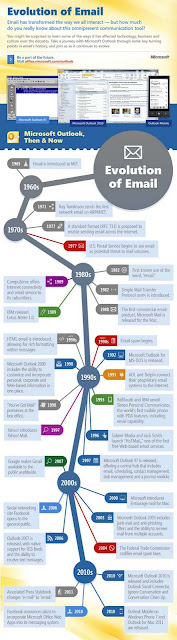
Evolution of Email (1965 – 2011*)


Source : MicrosoftFeed

Tuesday, March 8, 2011

PDF modifier for linux

PDF Mod is a simple application for modifying PDF documents.You can reorder, rotate, and remove pages, export images from a document, edit the title, subject, author, and keywords, and combine documents via drag and drop.


How to Install :

We can install PDFMod using PPA . Open the terminal and run the following commands
sudo add-apt-repository ppa:pdfmod-team/ppa
sudo apt-get update
sudo apt-get install pdfmod

Wednesday, February 23, 2011

File corrupter

I found and interesting tool today at blogsolute. This is used to destroy a file. Actually we have tools to recover data from a corrupted file. But this is reverse. We can corrupt our file. Its name is File Destructor.

File Destructor is a web application that can generate a corrupt file with desired file name, file size and file extension. This sounds more realistic and file contains nothing but corrupt data, so when you try to open it does not work.

It is fully compatible with Windows and Mac

File Destructor

Tuesday, February 22, 2011

Facebook: How to disable New Photo viewer and get back Old version

I already posted about executing a script in my previous post to get rid of new facebook photo viewer.. But we have two more easy ways to do that. Simply delete the word "&theater" in the URL and enjoy the4 old version.
Or simply press F5. You will be with your old photo viewer. Comment if this doesn't work.

Facebook Photo Theater Killer

The new photo viewer or theater is embarrassing for many facebook users. To get rid of this I found a userscript.


Script Summary:
Kills the annoying (IMHO) new photo theater on facebook. Instead loads the old photo viewer, as long as facebook keeps it running.
Version: 2.1
Copyright: 2011+, David Harvey
License: GPL version 3 or any later version; http://www.gnu.org/copyleft/gpl.html 

This has been tested in Chrome with the Tampermonkey extension and in Firefox with the Greasemonkey add-on. Let me know if you run into any issues. Also, if you find the script helpful, if you would, please, "fan" it.
2.1: Fixed an issue in newer versions of Firefox/Greasemonkey that caused the script to error out.
2.0.1: Fixed the timeout on the script to check the links for updating.
2.0: Added some functionality to capture the click before it can launch the theater. The theater still OCCASIONALLY shows up, but not as often as before.

The script is can be found here.

Source : http://userscripts.org/scripts/show/96773

Friday, February 18, 2011

BINARY TRAFFIC

While browsing sites for getting free traffic to my blog, I found a very interesting but doubtful site called binary traffic dot com, So i decided to write about and check wheter it is possible to get real traffic from this site and I signed up to just test it.

Convert PPT to PDF

Have you ever tried converting total PPT into a PDF and viewing it using adobe reader or so. The main reason behind conerting to PDF documents is that it provides security.

We have a ready to use tool for this purpose.Moyea PPT to PDF Converter (Word, Excel, PowerPoint to PDF) is a free, smart and integrated PDF creation program that converts most printable Windows applications including Word, Excel & PowerPoint to PDF file in one mouse click.
Download it from developers page or click below.

Thursday, February 17, 2011

Send free sms without registration

We have many sites allowing to send free sms from internet to mobile. But in websites like 160by2.com , way2sms.com , fullonsms.com etc., we have to register with our mobile number. But we also have a few sites which provide anonymous sms service. Some of them are listed here.
This allows Indian numbers only.
2. Seasms.com
This allows us to send messages world wide for free.
3. Spicesms.com
This allows only 130 character sms.
4. Bollywoodmotion
This allows us to send 500 character sms. But this is limited to Indian numbers only. One more facility is that it doesn't include any ads in sms.

Note : If any illegal activities are being done using above said sites. You may be traced and caught. We are not responsible for the consequences.

Saturday, February 12, 2011

Nokia and Microsoft Announce Strategic Partnership

Yes, this is true. Nokia and Microsoft announces a strategic partnership. Actually I'm too late in posting this. All this is happened yesterday. For details goto Microsoftfeed

Accelerated Processing Unit (APU), New Era in Computing

APU is a combination of GPU and CPU. When data are processed in a computer, GPU and CPU both processes the data together. So, there is some lack of time by moving data from GPU to CPU and vice-versa. AMD is going to eliminate this time gap by combining CPU and GPU together in a single micro-processor or an APU.AMD is the only one competitor of Intel’s market.
AMD is going to launch their APU or Accelerated Processing Unit in this year. Not only AMD Intel is also working with this architecture and hopefully they will also release their new processing technology code named

Bing is more accurate than Google....!!


According to a study conducted by Hitwise, Bing users clicked on search results 81.54% of the time, while Google users only clicked 65.58%. This shows that Bing is offering more accurate results than Google.
“The share of unsuccessful searches highlights the opportunity for both the search engines and marketers to evaluate the search engine results pages to ensure that searchers are finding relevant information.” said Hitwise
According to Neowin “Bing’s market share has gone up by 6%, while Google is slowly losing its dominance. Although Google still holds the top spot with 67.95% market share, Bing is slowly catching up. Bing-powered searches, including both Bing.com and Yahoo.com, claim a total of 27.44%.”

source : Microsoftfeed

Wednesday, February 9, 2011

Get Ubuntu tips with fortune


In order to install the Ubuntu Tips Applet, you will first have to install the application fortunes-ubuntu-server.  To do that, follow these steps:
  1. Open up a terminal window.
  2. Issue the command sudo apt-get install fortunes-ubuntu-server.
  3. Type your sudo password and hit Enter.
  4. Accept any dependencies.
  5. Allow the installation to complete.
Now download the .deb file from the GTK-Apps web site.
  1. Change directory to where the .deb fle is downloaded. ex: cd ~/Downloads.
  2. Type the command sudo dpkg -i "downloaded file name .deb "  ofcourse without quotes.
  3. Type your sudo password and hit Enter if asked so.
  4. Allow the installation to complete.


After the installation start the app from Applications > Accessories > Ubuntu Tips Applet. What you will notice immediately is a small icon in your notification area.  The icon is the swirling line between the network applet and the sound applet. If you left-click that icon you can do the following:
  • Set the interval for tips (by default the interval is one minute).
  • Show a single tip.
  • Disable auto refreshuit the applet.
Thats it! You're done.


Tuesday, February 8, 2011

How to check and enable IPV6 in Windows XP

As IPV6 is activated officially by IETF, many are in need of it. In windows 7 it is already enabled. However, due to some circumstances, it may be disabled. Also due to the failure of Windows Vista, many people stuck to Windows Xp till now. Especially in case of educational institutions, firms etc., where a large number of computers are present, are still in dilemma whether to shift to Windows 7. So if these users wanna activate IPV6, there is some procedure here.

1) Just goto run by pressing windows button + R.
2) Type cmd to enter command prompt.
3) Type ipconfig and check for the entry IPV6.


4) If not found then type netsh and press enter.
5) Now type interface and press enter.
6) Type ipv6 and press enter.
7) Type install and press enter.

I think there is another way to do it. But i prefer this as it is easy.
If anyone want to know how to do it using GUI and not from command prompt, just leave a comment here. Also if there is any problem with IPV6 installation let me know through your comments.

Learn the basics of Photoshop in 25 minutes

I came across a good post at Lifehacker on basics of photoshop. I am already familiar with photoshop and for the beginners it would be great. Just check out the tutorial at Lifehacker

Nokia bubble effect for symbian TOUCH phone

Today, I came to know about a new application for Nokia mobiles. Those who are on Symbian OS (operating system) and using touch screen can avail this.Bubbles is a fun and efficient way to take a shortcut to timely or useful things on your phone.  Bubbles appears when you press the "Apps" key while your device is in sleep mode (instead of the black screen with clock and unlock button).  Simply grab a bubble and drag it to one of the available drop points to initiate the corresponding action.

Currently there are bubbles available for the following actions.

* Unlock the phone
* View new messages
* View/Respond to missed calls
* Control the music player
* Control the FM radio
* Change profile (profile timing also supported)
* Call/Message your three best friends
* Activate the back-light to use as a flashlight
* Show your current location using Ovi Maps
* Change the background of the Bubbles screen
* Display when battery needs charging

The product is still in beta version.

Bubbles can also be used to pass the time by "throwing" bubbles and watching them bounce back and forth around the screen for fun.
You can download it from here.

Saturday, February 5, 2011

Online College Article 2

Online Education Article 1

Tuesday, February 1, 2011

Smart File Advisor

Smart File Advisor will help you find appropriate programs to open your files using Filefacts.net web site database. If you are having problems to open some specific files in your system install Smart File Advisor and it will help you. Smart File Advisor will be able to identify the type of the file you want to open even if it have a wrong file extension by analysing file contents.


Smart File Advisor also insludes a MD5, SHA-1 and CRC32 checksum/hashing tool for free! You will be able to use it to verify the integrity of files you download from the Internet, after installing Smart File Advisor just right click any file in Windows Explorer and you will have a new option named Checksum.

Download from the developers website or below.

Facebook Friends Page - Lesser known feature

I came across an interesting fact today about the Facebook. It maintained a Facebook friends page. After logging in just go to http://www.facebook.com/friends/ and click on phone book in the left side bar. That's it. All your friends phone numbers are listed. I think this is a lesser known feature.

PDF Jumbler

A simple tool to rearrange/merge/delete pages from PDF files. The modular backend system uses either JPedal or JPod to display PDFs and iText or Apache PDFBox to save them.
Source : SourceForge

Multiple Image Resizer .NET


Multiple Image Resizer .NET uses the Microsoft .NET Framework, if you do not have the Microsoft .NET Framework v4.0 then the installer will download and install it for you.
The installer has been fully tested on a range of Windows platforms - simply download and run Mir4Installer.exe then follow the instructions on the screen.

Multiple Image Resizer .NET does not require registration or an unlock code, and does not gather or transmit information about you, your computer or your data. All that we ask is that you use Multiple Image Resizer .NET within the terms of the license agreement.


Hardware and Software Requirements :

Multiple Image Resizer .NET 4 uses the Microsoft .NET Framework v4.0, if you do not have the Microsoft .NET Framework v4.0 then the installer will download and install it for you.

Supported Operating Systems (32bit and 64bit): 

  • Windows XP (Service Pack 3)
  • Windows Server 2003 (Service Pack 2)
  • Windows Vista (Service Pack 1)
  • Windows 7
  • Windows Server 2008 (not supported on Server Core Role)
  • Windows Server 2008 R2 (not supported on Server Core Role) 

The download is 6.89Mb in size.
The current version of Multiple Image Resizer .NET is 4.0.0.2


BUM - Boot Up Manager for Linux

To manage start up services etc in linux distributions, there are plenty of tools available to make the process easier. One of those tools is Boot Up Manager (BUM). BUM is a graphical tool that allows you to select which services you want to run at startup. Not only that, but there might well be processes running on your machine that you do not need. Solution to these needs is BUM.

Installation :

1. Open up a terminal window.
2. Issue the command sudo apt-get install bum.
3. Type your sudo password and hit Enter.
4. Accept any dependencies (if necessary).

Once the installation is complete, leave that terminal window open so you can start up the tool.

How to start?

In terminal just type "sudo bum" without quotes to start BUM.

System Silencer .... Control the way your computer acts when idle

System Silencer is a freeware application that allows you to easily customize the way your computer should react when it's idle (you haven't used your keyboard and mouse for a longer period).


This little app will help you control what can be seen and heard from your computer when you're away / idle.

Run System Silencer and when you're away your computer's monitor can turn itself off, the sound will be muted and you can even choose to hide your taskbar and desktop icons! Of course, you can skip all the hiding and just configure System Silencer to lock your computer while you're away.

Version 1.2 looks like this (future versions may look different - with more actions / options):


License : Freeware
You can download this from developers website.

New Windows Vulnerability

I am already late in posting this. My dear readers, if you on a windows machine (whatever may be the version including the latest W7). There is a vulnerability existing in windows. It is related to security. It results in attackers to execute scripts on your machine without your knowledge. So I suggest 3 things.

  1. Maintain a updated antivirus 
  2. Maintain a good firewall.
  3. Download this fix from Microsoft and run on your computer.This is a patch from Microsoft.

File Joiner, Combine .001, .002, .00x Files

The main reason for splitting files is to prepare a file for distribution. File hosting sites often have file size limitations that force a user to split the file before it can be uploaded. This is usually done with the help of archiving software such as Winrar, Winzip or 7zip.

Internet users sometimes however may encounter split files with file extensions like .001, .002 and so on which many unpackers do not support.

File Joiner is a free portable application for Windows that can join these files back together.


Features 


  • auto sorting (numerical sorting (.001, .002) or full path sorting)
  • auto loading consecutive parts when you open or drag&drop file with extension .001
  • auto output file path generator (file "c:\test.avi.001" will generate output file path "c:\test.avi")
  • faster joining with option to append all files to first file
  • MD5 and CRC32 hash calculation for output file
  • full UNICODE support
  • loading files from folder and recursive loading from sub-folders
  • option to associate extension .001 in windows explorer, so you can load files by double clicking the file (not portable)
  • progress bar to monitor the join operation (also Windows 7 progress bar in taskbar)
  • File Joiner 64bit (x64) and 32bit (x86) versions available


Licence :
File Joiner is released as freeware, 100% free to use. You may copy and/or distribute File Joiner only in its original, unaltered form, with all files included unmodified.
File Joiner is intended as freeware, you are not allowed to charge any fee or other compensation for the software.


File Joiner can be downloaded at the developer website or from here.

32-bit

OS: Windows 7, Vista, XP, 2000
Size: 41 KB   

64 bit
OS: Windows 7 64bit, Vista 64bit, XP 64bit
Size: 52 KB


A great Linux combination of thesaurus : WordNet + Artha

You may have heard of WordNet before. It’s a very handy command-line interface for the WordNet lexical database. When combined with a front-end however, WordNet is very powerful. There are many front ends for WordNet, but one of the easiest to use is Artha. Artha is a free, cross-platform thesaurus that depends upon WordNet for the backend.

Installation :

The installation of these two tools is simple. You can either search for them and install them from within your Add/Remove Software tool (search for “wordnet” and “artha” – no quotes), or you can install them via the command line. Let’s install from the command line. To do this, follow these steps:

1. Open up a terminal window.
2. Issue the command sudo apt-get install wordnet artha.
3. Type your sudo password when prompted.
4. Accept all dependencies (if necessary).

That’s it. Once installed you will find Artha in Applications > Accessories.