Showing posts with label Twitter. Show all posts

Sunday, October 2, 2011

HACK TWITTER WITH TWITTER PASSWORD DECRYPTOR

Firstly, let me clear you one thing. This tool takes out the passwords of twitter accounts stored in cookies in the computer. So In order to get those, you need a physical access to the PC.

Twitter Password Decryptor is a freeware that works to restore email and password when you forget your email and password. This software is available two versions, the portable version and the version of the installer.

Actually, this software working on computers cookies primarily to look for a twitter account is stored in it. Once found, the software is immediately displayed.

This software can work on multiple platforms, from Windows XP to the latest operating system Windows 7. Follow the steps as below:

1. Download Twitter Password Decryptor.

2. Once downloaded extract the zip file.

3. Install on your computer.

4. Open Twitter Password Decryptor.

5. Click the Start Recovery will be out your email and password.

6. Click the Show Password to see the password.


[via]If you enjoyed this post, make sure you subscribe to my RSS feed! Comments are encouraged
Wednesday, June 8, 2011

How to Block Facebook, Twitter, Email for Few Hours Daily


install the Website Blocker extension. Edit some settings and you can block any website for as many hours as you want.
Choose the settings wisely and the extension provides a simple interface to  block websites, as many as you want and at custom times you want. You can also type an optional message.


How to Block Any Website for Employees / Users


This extension works well if you want to prevent access of social media sites by your employees. Simply block the sites during working hours and they will never know how to access them.
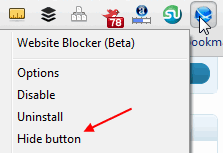
1. Hide the Website Blocker icon from the Chrome toolbar. Right click the icon and click “Hide button”
Hide button
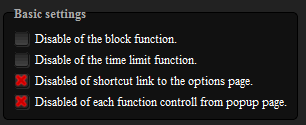
2. Disable the link from showing in the block message alert which can guide people to disable the options. Also disable the ability to edit settings from the popup alert options
block disable link
Unless people really know how to browse around into Chrome settings, identify the website blocker, experiment with its settings and disable it –  it should work to block websites for most people. Just keep Chrome as default and only browser on the computer.

Friday, November 5, 2010

5 Free Online Service to share music on Twitter


Apart from a social networking website, Twitter is said to be “Real Time Search Engine” and may be a “Future Search Engine”. There are huge numbers of applications available for tweeting your post, scheduling it, making calls via twitter and many more. With sharing text messages and calls, there are lots of applications available which allows you to listen and share music on twitter.

Here are 5 awesome web applications to share music with your friends

1. Twiturm:

Twiturm allows you to share your music with your friends. You can upload your own MP3 files or can choose from the listed music files. You can play or share music on social network. You just need to register for free, add MP3 and post to twitter.

2. Song.ly:

Song.ly is easy service to discover and share music. I like the layout, it’s neat and good. It doesn’t have any useless ads or links. It provides you the free add on for Firefox and internet explorer to make service handy.

3. Twt.fm :

Twt.fm is another web application to share music on twitter; you don’t have to sign up for discovering and sharing music. If you are unable to find any video you can give URL of your own music file.

4. Songza:

Songza don’t provide you the option to make your own playlist of songs. You can search, listen and manage playlist. When you want to tweet just use shortened URL of the selected songs.

5. Blip.fm:

Blinp.fm is an online radio station and you can select songs by the name of DJ or songs. Once you selected the songs, it’s easy to share with your followers on twitter. Sharing on blinp.fm is called as blipping. It’s fun to blip on this website.


Music is great way to share your feelings, so start listening and sharing it with your followers on twitter. Don’t forget to share with us which service you use to share music on social networks.