Showing posts with label Open Source. Show all posts

Thursday, December 1, 2011

10 Little Known Tricks about VLC Media Player


Make Artistic Sketch


Tools > Effects and Filters > Video Effects > Image Modification > check on Gradient


Add Logo / Watermark on Video

This is temporary.

Tools > Effects and Filters > Video Effects > Logo > Check on Logo and give the file location of Image File either PNG or JPG.

Inbuilt Video Converter

Media > Convert/ Save >Add File > Convert > Select Output format and directory to start processing video


Video Streaming

Media > Open Network Stream >Enter URL

It takes care of rest of the buffering part. :)

Download Online Media / Streaming Videos

 Tools > Codec Information and at the bottom, you will find address of file in Location box.
Alternatively, we can do it by just using Record Option to capture live streaming of video. Enable Advanced Control from View menu and you will see RECORD button (Red circle)

Play RAR files / Splitted video Parts

Movie when downloaded from internet comes in several parts with extension .001 .002 which are splitted using WinRAR. You no more need another software to join those files for playback. Just drag the .001 file into VLC Player and you are ready to watch the movie.


Record from Webcam

Media > Open Capture Device and Play after selecting the WebCam.


[via]If you enjoyed this post, make sure you subscribe to my RSS feed! Comments are encouraged

Friday, September 30, 2011

iScanner :Tool to detect and remove malicious codes and web page

iScanner is a free open source tool lets you detect and remove malicious codes and web page malwares from your website easily and automatically. iScanner will not only show you the infected files in your server but it's also able to clean these files by removing the malware code ONLY from the infected files.

Current Features:


  • Ability to scan one file, directory or remote web page / website.
  • Detect and remove website malwares and malicious code in web pages. This include hidden iframe tags, javascript, vbscript, activex objects, suspicious PHP codes and some known malwares.
  • Extensive log shows the infected files and the malicious code.
  • Support for sending email reports.
  • Ability to clean the infected web pages automatically.
  • Easy backup and restore system for the infected files.
  • Simple and editable signature based database.
  • You can easily send malicious file to iScanner developers for analyzes.
  • Ability to update the database and the program easily from iScanner's server.
  • Very flexible options and easy to use.
  • Fast scanner with great performance.
  • Yes, it's FREE!!


[via] If you enjoyed this post, make sure you subscribe to my RSS feed! Comments are encouraged

Thursday, September 29, 2011

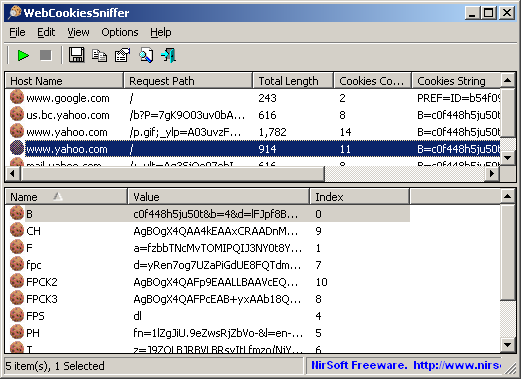
WebCookiesSniffer : Capture cookies in real time

WebCookiesSniffer is a packet sniffer tool that captures all Web site cookies sent between the Web browser and the Web server and displays them in a simple cookies table. The upper pane of WebCookiesSniffer displays the cookie string and the Web site/host name that sent or received this cookie. When selecting a cookie string in the upper pane, WebCookiesSniffer parses the cookie string and displays the cookies as name-value format in the lower pane.


Requirements:

1) WinPcap : an open source capture driver that allows you to capture network packets on any version of Windows.
2) Microsoft Network Monitor Driver version 2.x (Only for Windows 2000/XP/2003): Download
3) Microsoft Network Monitor (3.x) (For Windows 7 ) : Download

Limitations :

Cannot capture files of a secured Web site (HTTPS)
 32 bit               --             64 bit              


If you enjoyed this post, make sure you subscribe to my RSS feed! Comments are encouraged. 

Thursday, September 8, 2011

Solution for : Windows7 / Ubuntu 11.04 option missing from the boot menu


Today, I've done a mistake while installing my Ubuntu 11.04 alongside windows.
After selecting the partitions and assigning /boot, swap and / we need to choose where to install the grub boot loader. By default, the boot loader should be installed in the 1st partition of the first hard disk i.e., (hd0,0). I have windows7 already installed on my system. So, there is one more option named windows 7 loader. Due to lack of knowledge, I thought that default boot loader will be replaced by the new Grub loader and selected it. What happened is, I have both windows and ubuntu safely residing on different partitions of my hard disk. But not able to boot into windows7. In the Grub that appears at system startup, we need to choose an option named windows7 loader in order to get into windows box. But entering this option yielded with the result of same boot menu again and again. Then I understood my mistake. I have replaced the windows boot loader with the grub loader. This is my mistake. So, I entered my ubuntu, connected internet and then googled for the solution. After much work and many trails, I did the following procedure.

  1. Reboot and enter the option named "windows 7 recovery loader" which appears in the boot menu of grub. This takes you to a command prompt(windows).
  2. Type "bootrec /FixBoot" and press Enter
  3. If it doesn't work then type "bootrec /RebuildBcd" or
  4. "bootrec /FixMbr" (all commands without quotes).
  5. If it worked, no message will be displayed. But in case of error, the error message will be displayed.
  6. Try following the above order.
  7. Reboot. You will enter into Windows without asking for boot menu. Don't panic. Your ubuntu is still safe.
  8. Now put your ubuntu CD and delete the partitions given for /boot,swap,/ . 
  9. Make them again as usual and reinstall the ubuntu without touching bootloader installation area. (Leave it as it is. It gets installed into /dev/sda. And reinstalling doesn't delete your files in ubuntu).
  10. After installtion, you will be back with your bookmarks, personal folders etc,.
  11. Reboot to check for dual boot menu.
  12. Now, grub is same as before. But entering the option "Windows 7 loader" will take you to windows. Otherwise you will be redirected to Ubuntu.


Note : Don't lose patience and don't get tensed. It works fine.Let me know through your comments if the problem is not cleared.

If you enjoyed this post, make sure you subscribe to my RSS feed! 

Tuesday, February 1, 2011

A great Linux combination of thesaurus : WordNet + Artha

You may have heard of WordNet before. It’s a very handy command-line interface for the WordNet lexical database. When combined with a front-end however, WordNet is very powerful. There are many front ends for WordNet, but one of the easiest to use is Artha. Artha is a free, cross-platform thesaurus that depends upon WordNet for the backend.

Installation :

The installation of these two tools is simple. You can either search for them and install them from within your Add/Remove Software tool (search for “wordnet” and “artha” – no quotes), or you can install them via the command line. Let’s install from the command line. To do this, follow these steps:

1. Open up a terminal window.
2. Issue the command sudo apt-get install wordnet artha.
3. Type your sudo password when prompted.
4. Accept all dependencies (if necessary).

That’s it. Once installed you will find Artha in Applications > Accessories.

Sunday, November 21, 2010

Access Blocked Websites

 
In many corporate Environments, administrators often block some websites in order to let the users not open some. But we have a good tool to open those websites directly in front of those who had stopped you. The name of the tool is ULTRA VPN. UltraVPN is a client/server SSL VPN solution based on OpenVPN. It encrypts and anonymizes your network connection. UltraVPN is a simple user interface to connect or disconnect to VPN servers.After Installation you will have an icon in tray. Just connect from it to start using the tool. Any individual user who want to protect his/her privacy can use UltraVpn. The main purpose of reason of using this is to access the internet in resctricted areas too. To use this tool, just download the software client from the developers website or from the link given below. By using this, you can have the access to the sites like free e-mail service providers, social networking sites for hang out, various websites on hacking, Connect via skype etc,. The good part on UltraVpn is that you cannot use it for spam. If any one doubts the security of the tool can have a look at source code, modify if you want (i mean that you can build it yourself). Check the official website for more details.

Platform : Windows
Please let me know through a comment if the link is not working or else if you have any suggestions.

Tuesday, November 2, 2010

Aviary online creation tools

 
Aviary  suite is purely online. Here we can edit images, create mind-blowing effects, design logos, find colors, collaborate, and more. All you need is a web browser! Its Free! It includes many editors. By using peacock editor you can make all the stuff which you can with photoshop till now. It includes many effects too. The striking features is its free totally.

Monday, October 18, 2010

Delete, Move or Rename Files being used by Person or Application[UNLOCKER]


On Microsoft Windows system, it is more often that you come across an non-new error saying File is currently in use by another user or application while trying to have some operation on some files. This is also somewhat similar which can Delete, Move or Rename File in Use.I googled it many times and at last found this tool.

This may occur even the file is corrupted some times. Such files are generally auto executed or Virus like files which cannot be deleted by Anti virus program sometimes.This is not a hack. Yes, you are not actually running these files on your own will but it becomes difficult to perform any operation on files currently in use. So, Unlocker is a free small program which can take care of such files and processes.
Install it and you can see a option named UNLOCKER when you right click any file. So you just click it and that's it you can delete, move, rename as you wish.You can download it here.


Enjoy.........Have fun..!!


Wednesday, August 25, 2010

10 Great Web Apps for College Students

Taking Notes
1) Evernote
Evernote is a great note taking application, but that only scratches the surface of what it can do. If you are in a lecture, for example, you can also take a picture of the blackboard with your phone, upload it to the Evernote server, and thanks to Evernote's clever OCR algorithms, even pictures of handwritten notes become instantly searchable.
You can also use it to bookmark web pages and write down your own lecture notes. Best of all, you can use a web app, a Windows or Mac desktop app, or a Windows Mobile and iPhone app, all of which seamlessly synch with each other, so that your notes are always up to date.
2) Google Notebook
The Google Notebook is one of Google's lesser know products, but, thanks to a very well designed Firefox extension, it's a great tool for when you do most of your work in a browser already. If you do some of your research in Google Books and Google Scholar, you can also easily clip excerpts from books and articles into your Google Notebook.
One additional nice feature is that you can invite collaborators to work on a notebook with you. If you are doing a research project in a group, for example, you can easily share your research with your whole group.
Online Office Suites
3) Google and 4) Zoho
Word processors, spreadsheets, and presentation apps are probably the single most often used tool among college students, and while none of the online offerings can yet beat Microsoft Office (which, for students, now only costs around $60 for the Ultimate Edition), the online office suites from Google and Zohodo have some distinct advantages. Office obviously has a lot more features, but not only are both Google Apps and Zoho free, they also allow easier sharing of documents and working on projects collaboratively.
And while the online tools to create presentations are still a bit crude compared to Powerpoint or Keynote, they are both worthy contenders, especially if you don't feel the need to add lots of fancy transitions to your presentations.
If we had to choose between Google's and Zoho's offering, our vote would probably go to Google, as the Google apps have a slightly more organized and professional feel to them, which, in the end, is going to make it easier to focus on the content of your documents.
Bibliography
5) Zotero
The standard tool for doing extensive bibliographies in academia is Endnote. While that is a great tool if you are writing a dissertation, Zotero is a great choice for less extensive research projects - and it's free. Zotero is a Firefox extension, so it is not technically a web app, but in its next version, the developers are promising the ability to synch your bibliographies to a web version of the tool, so that your books and notes will become available everywhere.
For now, Zotero lives in the status bar of Firefox, and it pops up a little icon in your URL bar every time it recognizes a compatible website. Zotero already supports the databases of a huge amount of libraries worldwide, as well as a lot of standard academic databases such as JSTOR, LexisNexis, InfoTrac, PubMed, or ScienceDirect. Besides curating your citations, you can also add notes, tag items, or add attachments (like pdf files of articles). Once you are done, Zotero will create a bibliography for you in most standard formats, including APA, MLA, or Chicago style.
6) Easy-Bib
If you just need to create a short bibliography, Zotero might be more than you need. EasyBib will just help you to quickly create a bibliography entry in MLA format - a favorite among literature teachers. It can also handle the APA format, but you will have to subscribe to the pro version of EasyBib.
If you really hate figuring out where to put a comma and where to put a semicolon in your APA style bibliography entries, those $7.99 a year for the pro version might just turn out to be a bargain.
Also, if you only need a quick bibliography entry for a book, check out OttoBib, where you just have to enter the ISBN number and it will give you a fully formatted citation.
Staying Organized
7) Google Calendar
There are lots of great online calendars out there, including 30 Boxes and Yahoo's calendar app, but our favorite is the Google Calendar, simply because it is dead easy to use, integrates nicely with GMail, allows for importing and exporting your calendar, and lets you publish a site with your free/busy information with the click of a button, so that your friends know not to bother you while you are cramming for that test.
8) Remember the Milk
Remember the Milk might just be the tool that will keep you on track. And to make things even easier, Remember the Milk also integrates nicely with Google Calendar, so you can manage everything in one place.
Picking the Right Class
9) Rate My Professors
As much as teachers don't like sites like these, Professor Performanceand Rate my Professors can be useful tools when you decide which class you want to take. While almost every university makes you rate your professor at the end of the semester, schools never make this data public, so whenever you get a choice between professors, you really have no idea who the better teacher is. We like Rate My Professors a bit more than Professor Performance, simply because its search is a lot easier and the site is a bit more up-to-date. The site now also features a Facebook application.
Keeping in Touch
10) Meebo
As much as your teachers would like to think so, college isn't just about classes, papers, and long ours in the library. If you want to stay in touch with your friends no matter what computer you are on, Meebo is a great universal IM client that lives on the web. It supports, AIM, Yahoo Messenger, MSN Messenger, ICQ, Jabber, and Google Talk, as well as Meebo's own IM architecture.
What are we missing?
Are there other tools you use in school that we missed here? Let us know in the comments

Tuesday, August 24, 2010

WINRAR

 
Winrar needs no introduction, it is most common software which helps to store data in compressed format and make data easy to share. Inspite of having good features in Winrar , many of us don’t prefer to use Winrar. If you are one of them who don’t prefer to use Winrar then there are many alternatives available which have same or better features than Winrar.
Unlike Winrar, these softwares are free and user-friendly. Here are the 5 best alternatives to Winrar:
#1. IZArc
IZArc
is user-friendly and supports almost all the archives formats. It allows dragging and dropping files from windows explorer. The best part I like about IZArc is that it allows to open CD image like ISO, Bin and NRG and you can also convert them from one type to another.


#2. ZipGenious:
ZipGenious

is another alternative to Winrar which provides you option to compress more than 25 archive formats. Like IZArc, it also compresses CD and DVD files and gives option to preview pictures in compressed archives.

#3. 7Zip:
7Zip

can be used on all windows version as well as on linux. This is very easy to use and It supports around 23 archive formats. The best part of 7Zip is that it is also available in portable version to carry anywhere.

#4. PeaZip:
PeaZip

allows you to compress around 85 archive format. Apart from it , it have lots other features like saving archive’s layout, bookmark archives and folders, self-extractions and many more

#5. QuickZip:
QuickZip

supports around 21 types of archives. It includes features like context menu, cut and paste, drag and drop and provides you directory of files. It also provides different icons, tools tips and context menu.

If you are using proxy Winrar then I would suggest you to use above alternatives to Winrar which are free to download. Do share with us, which software you use to compress your files other than Winrar.

Monday, August 23, 2010

Open Source HTML5 Remote Desktop: ThinVNC


Now a remote computer can be accessed from any OS platform through any HTML5 compliant browser (Firefox, Google Chrome, Safari, etc).
ThinVNC is pure web based HTML5 Remote Desktop solution. ThinVNC takes advantage of the latest web technologies like AJAX, JSON and HTML5 canvas to deliver a high-performance Remote Desktop access over the web, using HTTP and SSL protocols.


ThinVNC also provides a Presentation Mode, which allows to securely invite people and show them the whole desktop or selected applications, always taking advantage of a pure-web access with no download or installation of any kind on the client side.
Requirements: HTML5 compliant browser
Website: http://www.supportsmith.com/ThinVNC/
License: GPL, Commercial