This article deals with JDBC completely.
What is JDBC?
Posted on: April 13, 2007 at 12:00 AM
JDBC is Java application programming interface that allows the Java programmers to access database management system from Java code.
The Java application programming interface provides a mechanism for dynamically loading the correct Java packages and drivers and registering them with the JDBC Driver Manager that is used as a connection factory for creating JDBC connections which supports creating and executing statements such as SQL INSERT, UPDATE and DELETE. Driver Manager is the backbone of the jdbc architecture.
JDBC has four Components:
1. The JDBC API.
2. The JDBC Driver Manager.
3. The JDBC Test Suite.
4. The JDBC-ODBC Bridge.
The API technology provides the industrial standard for independently connecting Java programming language and a wide range of databases.
The JDBC Driver Manager.
The JDBC Driver Manager is a very important class that defines objects which connect Java applications to a JDBC driver. Usually Driver Manager is the backbone of the JDBC architecture. It's very simple and small that is used to provide a means of managing the different types of JDBC database driver running on an application. The main responsibility of JDBC database driver is to load all the drivers found in the system properly as well as to select the most appropriate driver from opening a connection to a database. The Driver Manager also helps to select the most appropriate driver from the previously loaded drivers when a new open database is connected.
The JDBC Test Suite.
The function of JDBC driver test suite is to make ensure that the JDBC drivers will run user's program or not .
The JDBC-ODBC Bridge.
The JDBC-ODBC bridge, also known as JDBC type 1 driver is a database driver that utilize the ODBC driver to connect the database. This driver translates JDBC method calls into ODBC function calls. The Bridge implements Jdbc for any database for which an Odbc driver is available. The Bridge is always implemented as the sun.jdbc.odbc Java package and it contains a native library used to access ODBC.
Layers of the JDBC Architecture
Type 1 JDBC Architecture
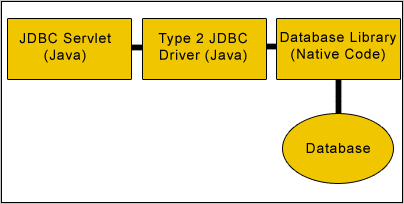
Type 2 JDBC Architecture
Accessing Database using Java and JDBC
For this, firstly we need to establish a connection between database and java file with the help of various types of APIs, interfaces and methods. We are using MySQL database.
Connection: This interface specifies connection with specific databases like: MySQL, Ms-Access, Oracle etc and java files. The SQL statements are executed within the context of this interface.
Class.forName(String driver): It loads the driver.
DriverManager: This class controls a set of JDBC drivers. Each driver has to be register with this class.
getConnection(String url, String userName, String password): This method establishes a connection to specified database url. It is having three arguments:
url: - Database url where stored or created your database
username: - User name of MySQL
password: -Password of MySQL
getMetaData(): This is a method of Connection interface. It retrieves the metadata of the database.
DataBaseMetaData: This interface gives information about the database like number of tables in the database, columns of the table etc.
getTables(null, null, "%", null): This method provides the description of the tables available in the given catalog. As we have set other parameters null, so it will provide only table names.
Code :
 import java.sql.*;


public class AccessDatabases {

  public static void main(String[] args) {

    try {

      Class.forName("com.mysql.jdbc.Driver").newInstance();

      Connection con = DriverManager.getConnection(

          "jdbc:mysql://localhost:3306/test", "root", "root");

      Statement st = con.createStatement();

      DatabaseMetaData meta = con.getMetaData();

      ResultSet rs = meta.getTables(null, null, "%", null);

      String tableNames = "";

      while (rs.next()) {

        tableNames = rs.getString(3);

        System.out.println(tableNames);

      }

    } catch (Exception e) {

    }

  }

}
In this section we studies how to connect to database and then list all the tables in the database. We have used MySQL database server.
FOR REST OF THE TOPICS LIKE EXCEPTION HANDLING AND ETC,. GOTO SOURCE
Source :
RoseIndia