Sunday, May 28, 2023

Leetcode 238 Product of Array Except Self - Solution

Problem link: https://leetcode.com/problems/product-of-array-except-self/

Description (copied from above link)

Given an integer array nums, return an array answer such that answer[i] is equal to the product of all the elements of nums except nums[i].

The product of any prefix or suffix of nums is guaranteed to fit in a 32-bit integer.

You must write an algorithm that runs in O(n) time and without using the division operation.


Example 1:

Input: nums = [1,2,3,4]
Output: [24,12,8,6]

Example 2:

Input: nums = [-1,1,0,-3,3]
Output: [0,0,9,0,0]


Constraints:

  • 2 <= nums.length <= 105
  • -30 <= nums[i] <= 30
  • The product of any prefix or suffix of nums is guaranteed to fit in a 32-bit integer.


Follow up: Can you solve the problem in O(1) extra space complexity? (The output array does not count as extra space for space complexity analysis.)


Solution: (link)

Intuition

Find product of all elements using a loop and then divide each element to remove it from product and add to result

Approach

  1. Find product of all elements using a loop and call it full_product.
  2. Divide full_product by each element to remove it from product and append to result
  3. During the process of full_product calculation, count the number of zeroes. If its more than 1, then all the elements of result array will be zeroes
  4. If only one zero is found in input array, do not multiple the full_product with that zero. The product of all remaining elements will be in that position only. All remaining positions will be zeroes

Complexity


Time complexity: O(2n) --> O(n) in worst case


Space complexity: O(1) --> Result array not included

Code

class Solution:
    def productExceptSelf(self, nums: List[int]) -> List[int]:
        zeroes = 0
        full_product = 1
        for idx, i in enumerate(nums):
            if i == 0:
                zeroes += 1
                if zeroes > 1:
                    return [0] * len(nums)
                position = idx
            else:
                full_product *= i
        if zeroes:
            result = [0] * len(nums)
            result[position] = full_product
        else:
            result = [full_product//i for i in nums]
                
        return result


If you enjoyed this post, make sure you subscribe to my RSS feed! Comments are encouraged

Sunday, December 4, 2022

How to find square root of a given number or expression


Newton-Raphson method


If you enjoyed this post, make sure you subscribe to my RSS feed! Comments are encouraged
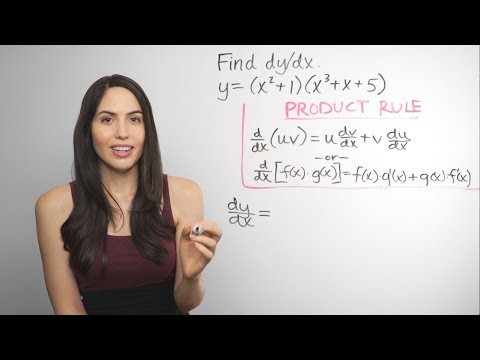
Derivatives in Mathematics

Example1: f(x) = x4 + 2x3 - x2 + 4x -1

 Answer: f1(x) = 4x3 + 6x2 - 2x + 4


Reference: https://www.youtube.com/watch?v=QqF3i1pnyzU


If you enjoyed this post, make sure you subscribe to my RSS feed! Comments are encouraged

Saturday, December 9, 2017

Django Building a blog | Designing blog data Schema

Below is for Ubuntu.
  1. source djangoTestEnv/bin/activate
  2. cd Desktop
  3. django-admin startproject blogSite
  4. cd blogSite
  5. python manage.py startapp myBlog
  6. Go to blogSite/blogSite/settings.py and add 'myBlog' in INSTALLED_APPS section. It should look similar to below
    INSTALLED_APPS = [
        'django.contrib.admin',
        'django.contrib.auth',
        'django.contrib.contenttypes',
        'django.contrib.sessions',
        'django.contrib.messages',
        'django.contrib.staticfiles',
        'myBlog',
    ]
  7. Open blogSite/myBlog/models.py and paste content in this file
  8. Since models.py is modified, we need to sync DB (migrate) to it. To do this, execute below commands
    cd blogSite (project root folder)
    python manage.py makemigrations myBlog

    output looks similar to below:
    Migrations for 'myBlog':
      myBlog/migrations/0001_initial.py
        - Create model Post

    This means Django just created   myBlog/migrations/0001_initial.py referring to our code in models.py. You can open this file and see how the migration looks like. 
  9. Execute below command to check SQL commands that Django executes
    python manage.py sqlmigrate myBlog 0001
  10. Apply migrations
    python manae.py migrate
  11. For any change in models, we need to apply migrations again just like above.


If you enjoyed this post, make sure you subscribe to my RSS feed! Comments are encouraged

Friday, December 1, 2017

Django Learn Series | Fields


Field Types:
  1. Numeric Data
    1. IntegerField 
    2. DecimalField
  2. Textual Data
    1. CharField
      • Requires max_length attribute
    2. TextField
      • Doesn't require max_length attribute
    3. EmailField
    4. URLField
  3. File Data
    1. FileField
      • Example: filename.docx
    2. ImageField
      • Example: abc.jpg
  4. Miscellaneous Data
    1. BooleanField
    2. DateTimeField
This link provides detailed info about field arguments and field types.