Showing posts with label internet. Show all posts

Monday, April 4, 2016

Connectify for Ubuntu | Works for Android

The pre-installed Network Manager in Unity does not support Access Point (AP) mode which is required for Android devices. Fortunately, KDE’s connection editor support this mode.

Below is how to do it yourself:

1. Click the link below to bring up Ubuntu Software Center and install kde-nm-connection-editor:

2. Once installed, press Alt+F2 and run command to launch the app:
kde-nm-connection-editor

3. Click Add button and choose “Wireless (shared)” from the drop-down list.
4. Type in a name, ssid, and select Access Point mode. If want, set up a password under Wireless Security tab. Finally, click OK.
5. Click Network Manager applet on Unity panel and then choose “Connect to Hidden Wi-Fi network”, choose the connection you created in previous step and click Connect button.

Turn on WLAN on your Android phone and you’ll see the access point in the list. Click connect and enjoy!


If you enjoyed this post, make sure you subscribe to my RSS feed! Comments are encouraged

Source

Friday, October 14, 2011

How to Unblock Youtube videos


ProxTube is the solution. Helps you to view blocked videos on YouTube. In some countries videos are blocked. Unblock them with this Addon.

Supported countries: Germany, Netherlands (more countries follow soon)


With a click on the toolbar icon, you can activate and deactivate the addon.
If a YouTube video is blocked, it uses a proxy server to view the video.
On Leaving the site it deactivates the proxy.


If you enjoyed this post, make sure you subscribe to my RSS feed! Comments are encouraged
Enhanced by Zemanta

Tuesday, October 4, 2011

Types of Wi-Fi Encryption You Can Use

There are many types of Wi-Fi encryption you can use on modern Internet routers. So which one should you use? Many people don’t even use encryption, and those that do just pick an encryption type at random without knowing what they do.

For a long time, WEP was considered to be an extremely good method of encrypting wireless connections. The acronym simply means Wired Equivalent Privacy. WEP however, was proved to have many flaws mainly involving the short key size, which were relatively easy to crack. WEP also does not provide for security against altered packets – a process where packets of information is intercepted by an intruder and then altered before sending them back, making it look like the intruder is valid user. These days, WPA (Wi-Fi Protected Access) and WPA2 have completely taken over from the old WEP encryption methods. You’ll probably still find WEP available on most routers, but it’s being phased out and someday it probably won’t be available at all. The main advantage WPA has over WEP is that it employs a powerful new feature called TKIP, or rather Temporal Key Integrity Protocol. TKIP is 128-bit, but instead of the key being static, it generates a new key for every packet of information that is sent, meaning it is a lot more secure. WPA also integrates a method of message integrity checks, used to defeat network attackers intercepting and altering data packets. WPA2 goes even further and replaces TKIP with CCMP. CCMP is an AES based encryption method that is much stronger even than TKIP.
In the home, you’ll probably want to use an encryption method called WPA-Personal. This is sometimes also called WPA-PSK. PSK stands for Pre-Shared Key, and is designed for home users and small offices where a server is not required for authenticating messages. It works by having each wireless device such as a laptop or smart phone authenticating directly with the wireless access point using the same key. Offices and large buildings may employ WPA-Enterprise. You can’t generally use this without a complicated authentication server set-up, but it does provide additional security.
Both WPA-SPK and WPA-Enterprise are available in WPA2, meaning even home users can now benefit from AES encryption over their Wi-Fi connections. All of these methods can transmit data at maximum speed, and you won’t notice any speed differences between each type of encryption. Therefore the recommendation is to use the best encryption you can. This means going for WPA2-PSK where you can in a home environment. There are new and more exotic types of Wi-Fi encryption becoming available, but for now even advanced users will find WPA2 more than adequate for most security applications.
If you are using wireless connections, you may want to check your router to make sure that it does not use encryption that can easily be cracked by users with the right toolset.


If you enjoyed this post, make sure you subscribe to my RSS feed! Comments are encouraged

Sunday, October 2, 2011

HACK TWITTER WITH TWITTER PASSWORD DECRYPTOR

Firstly, let me clear you one thing. This tool takes out the passwords of twitter accounts stored in cookies in the computer. So In order to get those, you need a physical access to the PC.

Twitter Password Decryptor is a freeware that works to restore email and password when you forget your email and password. This software is available two versions, the portable version and the version of the installer.

Actually, this software working on computers cookies primarily to look for a twitter account is stored in it. Once found, the software is immediately displayed.

This software can work on multiple platforms, from Windows XP to the latest operating system Windows 7. Follow the steps as below:

1. Download Twitter Password Decryptor.

2. Once downloaded extract the zip file.

3. Install on your computer.

4. Open Twitter Password Decryptor.

5. Click the Start Recovery will be out your email and password.

6. Click the Show Password to see the password.


[via]If you enjoyed this post, make sure you subscribe to my RSS feed! Comments are encouraged

Saturday, October 1, 2011

http://laptopvirusrepair.co.uk/ spreading malware

Avira detects the JS/Blacole.psak Java script Virus hosted on the site. In the code snippet, it is an obfuscated iframe that redirects to a site that will deliver exploits: zdesestvareznezahodi.com/tds/go.php?sid=1 . Detected Virus is : Kaspersky: Trojan-Downloader.JS.Agent.geo

This Site is listed in malwareblacklist

All windows platforms gets effected by this virus.
Side effects of JS/Blacole.psak Java script Virus:
• Can be used to execute malicious code
• Drive-by download


[via]If you enjoyed this post, make sure you subscribe to my RSS feed! Comments are encouraged

Friday, September 30, 2011

SFV (Simple File Verification) Ninja


I've came across an awesome tool today . I really need this. I thought it might be useful for you guys too. Coming to the concept, Many download portals and websites display file checksums on their download pages. The idea behind this is to give users the chance to calculate the checksum of the downloaded file to compare it with the checksum on the website. If the values are identical, then the file has not been tampered with (unless a hacker managed to alter the checksum on the page as well).
SFV Ninja is a portable software for Windows that can be used to calculate and display checksums of files that are accessible on the system. When you first start the program you have options to load individual files or files of a folder into the application. Users who have already worked with the program before can alternatively load a single checksum file or make the application crawl a folder for multiple checksum files to re-verify the data.

You can verify all files right away with a click on the Verify all files button. You may alternatively switch from the default CRC32 mode to MD5 or Sha-1 mode if those are preferred.
sfv ninja simple file verification


SFV Ninja is a portable software that is compatible with all recent 32-bit and 64-bit editions of the Microsoft Windows operating system. You  can download the latest version from the developer’s website.


If you enjoyed this post, make sure you subscribe to my RSS feed! Comments are encouraged

iScanner :Tool to detect and remove malicious codes and web page

iScanner is a free open source tool lets you detect and remove malicious codes and web page malwares from your website easily and automatically. iScanner will not only show you the infected files in your server but it's also able to clean these files by removing the malware code ONLY from the infected files.

Current Features:


  • Ability to scan one file, directory or remote web page / website.
  • Detect and remove website malwares and malicious code in web pages. This include hidden iframe tags, javascript, vbscript, activex objects, suspicious PHP codes and some known malwares.
  • Extensive log shows the infected files and the malicious code.
  • Support for sending email reports.
  • Ability to clean the infected web pages automatically.
  • Easy backup and restore system for the infected files.
  • Simple and editable signature based database.
  • You can easily send malicious file to iScanner developers for analyzes.
  • Ability to update the database and the program easily from iScanner's server.
  • Very flexible options and easy to use.
  • Fast scanner with great performance.
  • Yes, it's FREE!!


[via] If you enjoyed this post, make sure you subscribe to my RSS feed! Comments are encouraged

Thursday, September 29, 2011

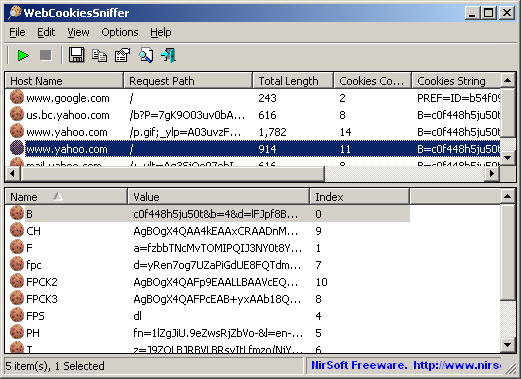
WebCookiesSniffer : Capture cookies in real time

WebCookiesSniffer is a packet sniffer tool that captures all Web site cookies sent between the Web browser and the Web server and displays them in a simple cookies table. The upper pane of WebCookiesSniffer displays the cookie string and the Web site/host name that sent or received this cookie. When selecting a cookie string in the upper pane, WebCookiesSniffer parses the cookie string and displays the cookies as name-value format in the lower pane.


Requirements:

1) WinPcap : an open source capture driver that allows you to capture network packets on any version of Windows.
2) Microsoft Network Monitor Driver version 2.x (Only for Windows 2000/XP/2003): Download
3) Microsoft Network Monitor (3.x) (For Windows 7 ) : Download

Limitations :

Cannot capture files of a secured Web site (HTTPS)
 32 bit               --             64 bit              


If you enjoyed this post, make sure you subscribe to my RSS feed! Comments are encouraged. 

Wednesday, September 28, 2011

Browser Speed Tests: Firefox 7, Chrome 14, Internet Explorer 9

This article is short and sweet (may be hot for some). According to LifeHacker, the following is browser analysis.

Cold Boot-Up—Winner: Opera!

Tab Loading—Winner: Opera!

JavaScript—Winner: Chrome!

DOM/CSS—Winner: Opera!

Memory Use (No Extensions)—Winners: Opera and Firefox!

Memory Use (Five Extensions)—Winners: Opera and Firefox!

Overall Scores

  1. Opera 11.51: 82%
  2. Firefox 7: 73%
  3. Internet Explorer 9: 47.5%
  4. Chrome 14: 43%


If you enjoyed this post, make sure you subscribe to my RSS feed! Comments are encouraged.

Sunday, September 18, 2011

Reduce size of an Image without reducing quality

Many times we could have faced a problem of size with larger images. If we decrease the size using some tools, the quality goes down to a great extent. But here is something different which made me to blog here. Here is a tool named JPEGmini . It a great tool which decreases the size by more than 2 times. Check it out.


If you enjoyed this post, make sure you subscribe to my RSS feed! Comments are encouraged. :)

Wednesday, September 14, 2011

Facebook and Amazon are storing variant passwords

Yes. I mean it. The support for the title is as below.

Facebook is storing the users' passwords in 3 forms.I've tried this too. You can use any of these to login to your Facebook account. The forms are :

  1. Original password. (say "passWord123")
  2. First letter capitalized. ("PassWord123")
  3. Reverse of capitalization i.e changing the case for all the letters. ("PASSwORD123")
The second type is for Mobile devices. Third type is also used in order to facilitate the user taking the caps-lock key into consideration i.e even if your caps-lock is on, you can enter your Facebook account by entering your password normally. The question here is "Is this a bug?" My answer is "It doesn't matter" why beacuse, this is purely to facilitate the users. But coming to bruteforce attacks, this raises the vulnerability level to 3 times.

Now, coming to Amazon it uses similar concept but not completely like Facebook. 

This is the link for the article about this. I didn't try this yet. Please let me know through your valuable comments if anything is wrong.


If you enjoyed this post, make sure you subscribe to my RSS feed!

Saturday, May 7, 2011

Fast Voip now offers Free calls to 13 countries including India

FastVoip announced their best ever deal to make India calls totally free along with other 12 countries where you can make free calls.FastVoip, a leading VOIP company from Europe has just announced their biggest ever promotion to date. FastVoip has now emerged as a strong competitor after this latest announcement to offer free calls to over 13 countries including India Landine.

You can make calls to following countries using FastVoip.

Belgium
Netherlands
Canada (+mobile)
Poland
China
Sweden
France
Thailand
Germany
United Kingdom
India
United States (+mobile)
Italy

Please note the only calls to landline phones are free except for USA and Canada where calls to mobile phones are free too.

In order to use the Free Calls promotion, you need to make a minimum deposit of 5 Euro by Credit card or $7.50 by Ukash. You will need to recharge your account every month for this amount in order to keep the free call service active.
Download FastVoip and start making those free calls.

Hack into a Live Security Camera

This is a part of Google Hacking. I already posted different keywords to use in Google search engine and get many hidden results. The link is here. Now this post is latest.  Just search these following strings in Google and select any result. Whoa, you can see a live cam on your PC screen!! The strings are given below:
inurl:”CgiStart?page=”
inurl:/view.shtml
intitle:”Live View / – AXIS
inurl:view/view.shtml
inurl:ViewerFrame?Mode=
inurl:ViewerFrame?Mode=Refresh
inurl:axis-cgi/jpg
inurl:axis-cgi/mjpg (motion-JPEG) (disconnected)
inurl:view/indexFrame.shtml
inurl:view/index.shtml
inurl:view/view.shtml
liveapplet
intitle:”live view” intitle:axis
intitle:liveapplet
allintitle:”Network Camera NetworkCamera” (disconnected)
intitle:axis intitle:”video server”
intitle:liveapplet inurl:LvAppl
intitle:”EvoCam” inurl:”webcam.html”
intitle:”Live NetSnap Cam-Server feed”
intitle:”Live View / – AXIS”
intitle:”Live View / – AXIS 206M”
intitle:”Live View / – AXIS 206W”
intitle:”Live View / – AXIS 210?
inurl:indexFrame.shtml Axis
inurl:”MultiCameraFrame?Mode=Motion” (disconnected)
intitle:start inurl:cgistart
intitle:”WJ-NT104 Main Page”
intitle:snc-z20 inurl:home/
intitle:snc-cs3 inurl:home/
intitle:snc-rz30 inurl:home/
intitle:”sony network camera snc-p1?
intitle:”sony network camera snc-m1?
site:.viewnetcam.com -www.viewnetcam.com
intitle:”Toshiba Network Camera” user login
intitle:”netcam live image” (disconnected)
intitle:”i-Catcher Console – Web Monitor”

Enjoy!!

Source : Prakash-Hacking

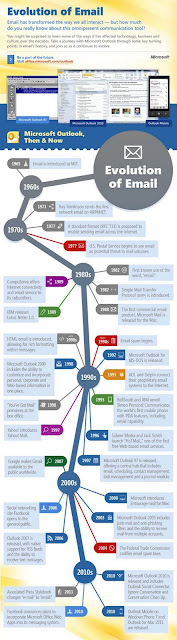
Evolution of Email (1965 – 2011*)


Source : MicrosoftFeed

Thursday, February 17, 2011

Send free sms without registration

We have many sites allowing to send free sms from internet to mobile. But in websites like 160by2.com , way2sms.com , fullonsms.com etc., we have to register with our mobile number. But we also have a few sites which provide anonymous sms service. Some of them are listed here.
This allows Indian numbers only.
2. Seasms.com
This allows us to send messages world wide for free.
3. Spicesms.com
This allows only 130 character sms.
4. Bollywoodmotion
This allows us to send 500 character sms. But this is limited to Indian numbers only. One more facility is that it doesn't include any ads in sms.

Note : If any illegal activities are being done using above said sites. You may be traced and caught. We are not responsible for the consequences.

Saturday, February 12, 2011

Bing is more accurate than Google....!!


According to a study conducted by Hitwise, Bing users clicked on search results 81.54% of the time, while Google users only clicked 65.58%. This shows that Bing is offering more accurate results than Google.
“The share of unsuccessful searches highlights the opportunity for both the search engines and marketers to evaluate the search engine results pages to ensure that searchers are finding relevant information.” said Hitwise
According to Neowin “Bing’s market share has gone up by 6%, while Google is slowly losing its dominance. Although Google still holds the top spot with 67.95% market share, Bing is slowly catching up. Bing-powered searches, including both Bing.com and Yahoo.com, claim a total of 27.44%.”

source : Microsoftfeed

Tuesday, February 8, 2011

How to check and enable IPV6 in Windows XP

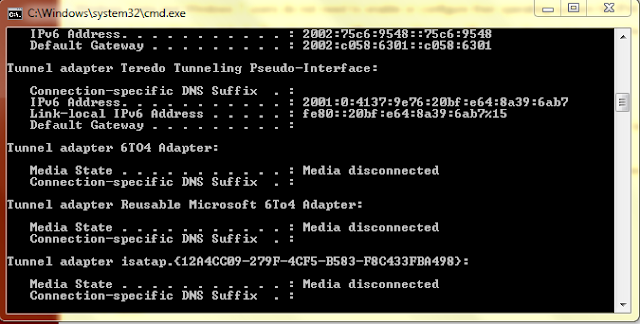
As IPV6 is activated officially by IETF, many are in need of it. In windows 7 it is already enabled. However, due to some circumstances, it may be disabled. Also due to the failure of Windows Vista, many people stuck to Windows Xp till now. Especially in case of educational institutions, firms etc., where a large number of computers are present, are still in dilemma whether to shift to Windows 7. So if these users wanna activate IPV6, there is some procedure here.

1) Just goto run by pressing windows button + R.
2) Type cmd to enter command prompt.
3) Type ipconfig and check for the entry IPV6.


4) If not found then type netsh and press enter.
5) Now type interface and press enter.
6) Type ipv6 and press enter.
7) Type install and press enter.

I think there is another way to do it. But i prefer this as it is easy.
If anyone want to know how to do it using GUI and not from command prompt, just leave a comment here. Also if there is any problem with IPV6 installation let me know through your comments.

Tuesday, February 1, 2011

File Joiner, Combine .001, .002, .00x Files

The main reason for splitting files is to prepare a file for distribution. File hosting sites often have file size limitations that force a user to split the file before it can be uploaded. This is usually done with the help of archiving software such as Winrar, Winzip or 7zip.

Internet users sometimes however may encounter split files with file extensions like .001, .002 and so on which many unpackers do not support.

File Joiner is a free portable application for Windows that can join these files back together.


Features 


  • auto sorting (numerical sorting (.001, .002) or full path sorting)
  • auto loading consecutive parts when you open or drag&drop file with extension .001
  • auto output file path generator (file "c:\test.avi.001" will generate output file path "c:\test.avi")
  • faster joining with option to append all files to first file
  • MD5 and CRC32 hash calculation for output file
  • full UNICODE support
  • loading files from folder and recursive loading from sub-folders
  • option to associate extension .001 in windows explorer, so you can load files by double clicking the file (not portable)
  • progress bar to monitor the join operation (also Windows 7 progress bar in taskbar)
  • File Joiner 64bit (x64) and 32bit (x86) versions available


Licence :
File Joiner is released as freeware, 100% free to use. You may copy and/or distribute File Joiner only in its original, unaltered form, with all files included unmodified.
File Joiner is intended as freeware, you are not allowed to charge any fee or other compensation for the software.


File Joiner can be downloaded at the developer website or from here.

32-bit

OS: Windows 7, Vista, XP, 2000
Size: 41 KB   

64 bit
OS: Windows 7 64bit, Vista 64bit, XP 64bit
Size: 52 KB


Sunday, January 16, 2011

Make Yourself Look Slim & Thinner in Pictures

Now we have Weight Mirror, an Interesting & Amazing Tool which Allows you to Reduce your Weight inside your Photos. You Can now Make yourself Look thinner & Slimmer in your photos.

If you Look at the photo given below you will see how amazingly this tool makes you look Slim & Thin without changing anything in your Face and other Features. Plus there are various options of Losing Weight you can Choose From.

There are many ways where you can use Digital Imaging to Edit your Photos and Make them Look better.
To do this go here.
Note : Let me know through the comments if link doesn't work.

Monday, January 10, 2011

Megaupload Automatic Downloader

Megaupload is one of the most popular file hosting sites on the Internet making it a prime target for automatic downloaders.File host downloaders come in different types. There are software programs like JDownloader that run on the desktop, web browser add-ons like Skipscreen and userscripts like Megaupload Automatizador Plus!.

The Megaupload userscript automates the whole downloading process from Megaupload. The script only works in Firefox with Greasemonkey installed at the moment.

All it takes to download a file from Megaupload is to load the url in the web browser. The script will automatically fill out the captcha and initiate the download once the short wait time is over.All it takes to download a file from Megaupload is to load the url in the web browser. The script will automatically fill out the captcha and initiate the download once the short wait time is over.
Enhanced by Zemanta