How to check and enable IPV6 in Windows XP
As IPV6 is activated officially by IETF, many are in need of it. In windows 7 it is already enabled. However, due to some circumstances, it may be disabled. Also due to the failure of Windows Vista, many people stuck to Windows Xp till now. Especially in case of educational institutions, firms etc., where a large number of computers are present, are still in dilemma whether to shift to Windows 7. So if these users wanna activate IPV6, there is some procedure here.
1) Just goto run by pressing windows button + R.
2) Type cmd to enter command prompt.
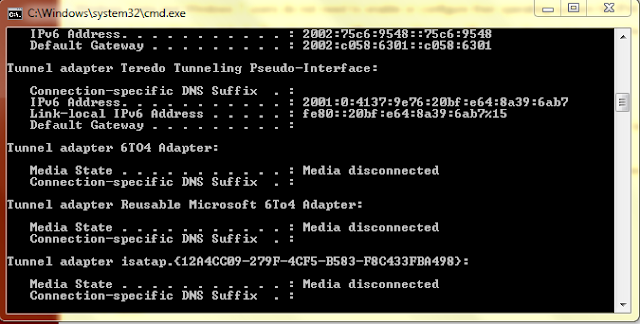
3) Type ipconfig and check for the entry IPV6.
4) If not found then type netsh and press enter.
5) Now type interface and press enter.
6) Type ipv6 and press enter.
7) Type install and press enter.
I think there is another way to do it. But i prefer this as it is easy.
If anyone want to know how to do it using GUI and not from command prompt, just leave a comment here. Also if there is any problem with IPV6 installation let me know through your comments.

1) Just goto run by pressing windows button + R.
2) Type cmd to enter command prompt.
3) Type ipconfig and check for the entry IPV6.

4) If not found then type netsh and press enter.
5) Now type interface and press enter.
6) Type ipv6 and press enter.
7) Type install and press enter.
I think there is another way to do it. But i prefer this as it is easy.
If anyone want to know how to do it using GUI and not from command prompt, just leave a comment here. Also if there is any problem with IPV6 installation let me know through your comments.


