Showing posts with label cookies. Show all posts

Sunday, October 2, 2011

HACK TWITTER WITH TWITTER PASSWORD DECRYPTOR

Firstly, let me clear you one thing. This tool takes out the passwords of twitter accounts stored in cookies in the computer. So In order to get those, you need a physical access to the PC.

Twitter Password Decryptor is a freeware that works to restore email and password when you forget your email and password. This software is available two versions, the portable version and the version of the installer.

Actually, this software working on computers cookies primarily to look for a twitter account is stored in it. Once found, the software is immediately displayed.

This software can work on multiple platforms, from Windows XP to the latest operating system Windows 7. Follow the steps as below:

1. Download Twitter Password Decryptor.

2. Once downloaded extract the zip file.

3. Install on your computer.

4. Open Twitter Password Decryptor.

5. Click the Start Recovery will be out your email and password.

6. Click the Show Password to see the password.


[via]If you enjoyed this post, make sure you subscribe to my RSS feed! Comments are encouraged

Thursday, September 29, 2011

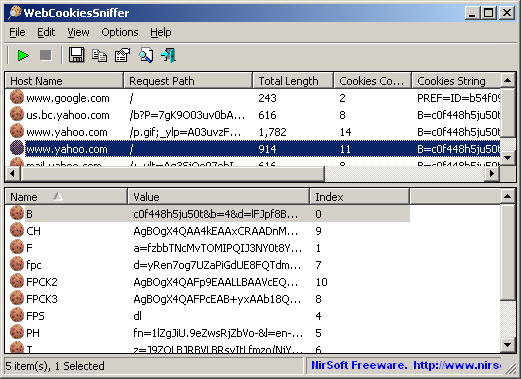
WebCookiesSniffer : Capture cookies in real time

WebCookiesSniffer is a packet sniffer tool that captures all Web site cookies sent between the Web browser and the Web server and displays them in a simple cookies table. The upper pane of WebCookiesSniffer displays the cookie string and the Web site/host name that sent or received this cookie. When selecting a cookie string in the upper pane, WebCookiesSniffer parses the cookie string and displays the cookies as name-value format in the lower pane.


Requirements:

1) WinPcap : an open source capture driver that allows you to capture network packets on any version of Windows.
2) Microsoft Network Monitor Driver version 2.x (Only for Windows 2000/XP/2003): Download
3) Microsoft Network Monitor (3.x) (For Windows 7 ) : Download

Limitations :

Cannot capture files of a secured Web site (HTTPS)
 32 bit               --             64 bit              


If you enjoyed this post, make sure you subscribe to my RSS feed! Comments are encouraged. 

Wednesday, July 13, 2011

What are Cookies ? Using Cookies in PHP.

Cookies are basically small files which are stored in User’s Computer. Their main purpose is to hold data specific to a particular client and Website, They can only be accessed either by Web Server or the client computer. This allows the server to access user specific data while saving space on the web server, It allows the server to deliver specific tailored web pages to a particular user.

Cookies act as a mechanism to store data in the remote browser and thus tracking and identifying return users.

A Cookie mainly contains data in (key,value) pairs for example (name,aneesh) , (message,cookies are great).

That’s a lot of theory there now let’s move on how to use cookies using PHP.


Cookies in PHP


PHP provides us a with suite of functions for manipulation of cookies.

Setting of Cookies

These functions include setcookie() or setrawcookie() . As cookies are a part of HTTP headers so , it’s obvious we need to call setcookie() before sending any data.

Accessing Cookies

Any cookies which are sent to the server from the client will be automatically included in $_COOKIE auto – global array.

These cookies can be accessed using following syntax:-

Code:
   $_COOKIE['name'];
Using Cookies in PHP

The setcookie() function is used for setting of cookies

Syntax :-
Code:
  setcookie(name, value, expire, path, domain, secure, httponly);
Note: In the above all arguments except name is optional.

Example:-
Code:
  setcookie('name', 'aneesh');
This declares a cookie with name=name and value=aneesh , As no expire time is provided the cookie will be deleted from the browser after ending the session.

Example involving Expire time:-

Code:
  $minutes = 20;
  setcookie('name', 'aneesh' , time()+($minutes*60));
As the ‘expire’ time input should be in seconds we multiplied it with ‘60’ as each minute contains 60 seconds.

Printing:-
Code:
  echo $_COOKIE['name'];
This would print the value of cookie which we earlier set using setcookie()

Output:-
Code:
  aneesh

Making a Simple Application in PHP using Cookies


Now that we know quite a lot about what are cookies and how do we use them lets use them and make a small PHP Application.

Visited.php :-

Code:


              Sample Page


Welcome Visitor

According to your browser cookies you have'; } else { echo 'have not'; } ?> visited our site in the last 10 days.
Output :-
1. When visiting for the first time :-
Code:
  Welcome Visitor
  According to your browser cookies you have not visited our site in the last 10 days.
2. Not visiting for the first time
Code:
  Welcome Visitor
  According to your browser cookies you have visited our site in the last 10 days.
Courtesy : Go4Expert (copied and pasted for my personal reference)